

What Is Form 16 and How to Download It Online From Your Employer or Portal?
Form 16 is your employer’s annual TDS certificate for salary. It summarises salary paid, tax deducted at source (TDS), exemptions, deductions and the final tax calculation for a financial year.
If you are searching for what is Form 16 and how to download it, the important point is this: employees usually cannot download their personalised Form 16 directly from the Income Tax Department or TRACES. Your employer downloads or prepares it and then gives it to you by email, through an HR/payroll self-service portal, or in printed form. TRACES is primarily the employer’s official system for generating TDS certificates.
Key Takeaways
- Form 16 is a salary TDS certificate issued by an employer under Section 203 of the Income-tax Act.
- It has two sections: Part A for employer/TDS details and Part B for the salary and tax calculation.
- The safest way to get it is through your employer’s official HR or payroll portal, or directly from HR/payroll.
- You can use Form 26AS and AIS on the Income Tax e-Filing portal to check whether salary TDS appears against your PAN.
- If Form 16 is missing or incorrect, ask the employer for a corrected certificate; do not rely on unofficial download websites.
- You may still be able to file an ITR without Form 16 by using salary records, Form 26AS, AIS and other income documents.
What Is Form 16?
Form 16 is a certificate issued by an employer when tax has been deducted from an employee’s salary. It records the employer’s and employee’s details, salary income, eligible exemptions and deductions considered by the employer, and TDS deposited against the employee’s PAN.
The Income Tax Department describes it as the “Certificate of Tax Deducted at Source on Salary.” It helps a salaried taxpayer understand the figures used in payroll tax calculations and prepare an income-tax return. Income Tax Department guidance on forms for salaried individuals
Form 16 is not the same as an income-tax return. It is a supporting tax document. You should review its figures before filing because you may have income, deductions or tax credits that were not included in your employer’s payroll calculation.
Who issues Form 16?
Your employer—such as a company, government department, school, bank or other salary-paying organisation—issues Form 16 to its employees where applicable. If you changed jobs during the financial year, each employer may issue a separate Form 16 for the period you worked there.
The employer obtains the TDS certificate through the official TDS system and authenticates it before issuing it to the employee. The certificate may carry a manual signature or a valid digital signature. Income Tax Department notification on Form 16 authentication
Form 16 Part A vs Part B
A complete Form 16 generally includes Part A and Part B. Both matter when checking your tax calculation.
| Section | What it shows | Why it matters |
|---|---|---|
| Part A | Employer name and address, employer TAN and PAN, your PAN, financial year, assessment year, and quarter-wise TDS deposited | Lets you match salary TDS with Form 26AS |
| Part B | Salary breakup, exemptions, deductions, taxable income, tax calculation, rebate or relief where applicable, and total TDS | Helps you understand how payroll arrived at the tax deducted |
Part A is the TDS-focused portion. Check that your name, PAN, employer details, financial year and TDS amounts are correct.
Part B is the salary-tax computation. It may include:
- Gross salary and allowances
- Exemptions considered by the employer, such as eligible HRA
- Standard deduction, where applicable
- Deductions claimed through payroll, such as eligible Section 80C, 80D or home-loan interest details
- Income or loss from house property reported to the employer
- Tax payable, rebate, cess and TDS
The document is useful, but it only reflects information you gave your employer or that the employer considered. For example, an eligible investment or deduction not submitted to payroll may need to be claimed in your ITR, subject to the tax rules that apply to you.
How to Download Form 16 From Your Employer’s Portal
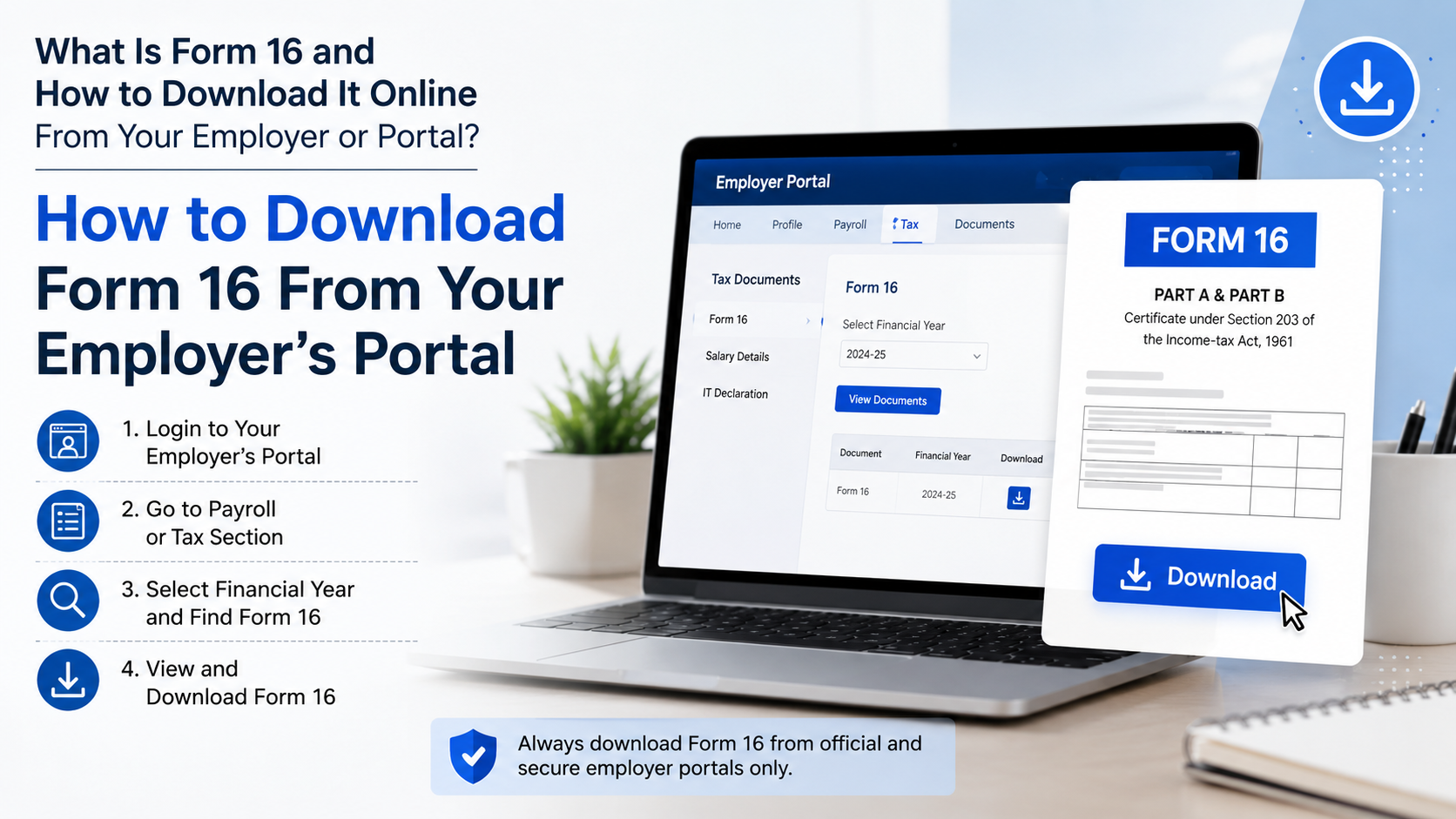
The shortest reliable method is to sign in to the same official HR or payroll portal you use for payslips, leave, tax declarations or salary information. Portal labels vary by employer, but the process is usually similar.
- Open your employer’s official HR, employee self-service, payroll or intranet portal.
- Sign in using your work credentials, registered mobile number, employee ID or single sign-on account.
- Look for a menu such as Payroll, Salary, Tax, Documents, My Documents, Income Tax, or Year-End Documents.
- Select Form 16 or TDS Certificate.
- Choose the correct financial year. For example, salary earned from April to March belongs to one financial year.
- Download the PDF and save it in a private location.
- Open it and check whether it contains both Part A and Part B.
Some employers publish Form 16 only after completing year-end payroll and TDS compliance. If the option is not visible, do not assume a website error—ask HR or payroll whether the document has been issued and where it will be shared.
Downloading Form 16 sent by email
Employers may email Form 16 to your registered personal or work email address. Before opening a link or attachment:
- Confirm that the sender uses your employer’s genuine domain or is a recognised HR/payroll contact.
- Check the financial year and your PAN details after opening the document.
- Avoid forwarding the PDF unnecessarily. It contains sensitive financial information.
- Do not upload it to unknown “Form 16 downloader” or ITR websites merely to open, convert or read it.
A password-protected PDF is common. The password format is set by the employer or payroll provider, so use the instructions in the employer’s email or portal instead of trying random password patterns.
Can You Download Form 16 Directly From TRACES or the Income Tax Portal?
Usually, no. This is one of the most common points of confusion.
TRACES, or the TDS Reconciliation Analysis and Correction Enabling System, is the Income Tax Department’s platform used by deductors—such as employers—to generate and download Form 16/16A certificates. The official TRACES FAQ states that only a deductor can issue Form 16 to an employee. TRACES FAQ: Form 16 download
The Income Tax Department website may provide a blank Form 16 format or sample. That is not your completed, employer-issued certificate and cannot replace it.
What you can download yourself
You can independently access tax information that helps you verify Form 16:
| Document | Where to access it | What it helps you check |
|---|---|---|
| Form 26AS | Income Tax e-Filing portal after login: e-File → Income Tax Returns → View Form 26AS | TDS/TCS and tax-payment information |
| AIS | Income Tax e-Filing portal after login: AIS or e-File → Income Tax Return → View AIS | Broader reported information, including TDS/TCS and other financial information |
| Payslips and tax projection | Employer payroll portal | Salary paid and TDS deducted during the year |
The Income Tax Department states that Form 26AS on TRACES displays TDS/TCS-related data, while AIS provides a broader view of information reported for a taxpayer. AIS and Form 26AS guidance
When Should You Receive Form 16?
Under the established Rule 31 timeline, employers issue Form 16 by 15 June following the end of the financial year in which the salary was paid and tax deducted. For example, the certificate for a financial year ending on 31 March is ordinarily due by 15 June of the following financial year.
In practice, availability on a payroll portal can depend on when your employer completes TDS filings and generates certificates. If the date has passed, send a clear written request to HR or payroll. Include:
- Your full name and employee ID
- PAN, preferably masked in ordinary email where possible
- Financial year required
- Your dates of employment, if you have left the organisation
- Personal email address if you no longer have access to the company portal
Former employees should request Form 16 from their previous employer’s HR or payroll team; leaving a job does not erase the employer’s responsibility for its period of salary payment and TDS compliance.
How to Check Form 16 Before Filing Your ITR
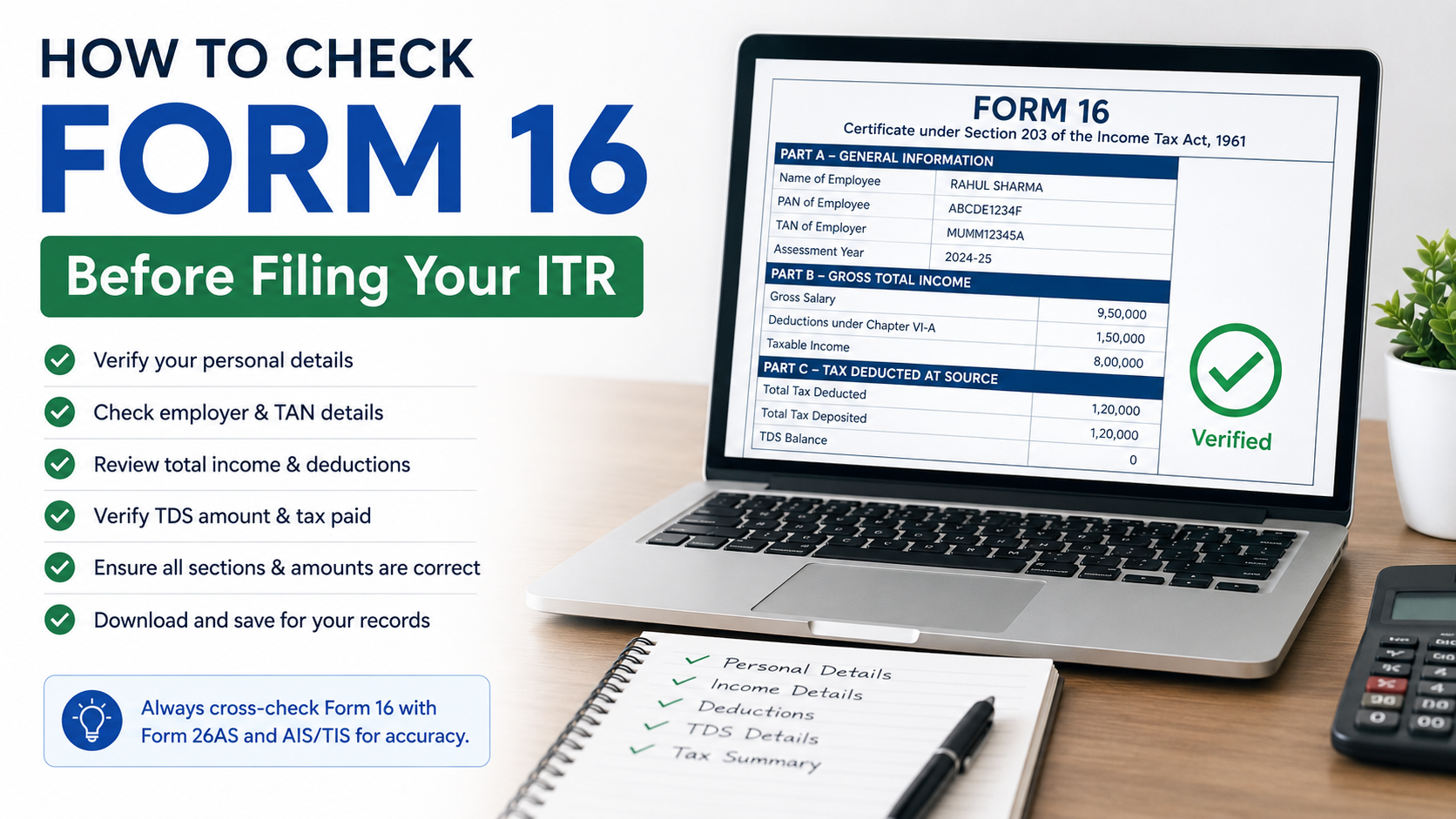
Do not treat Form 16 as a document to upload and forget. Compare it with your records before filing.
A quick five-point check
- PAN: Your PAN must be correct. A wrong PAN can prevent TDS credit from appearing properly.
- Employer TAN: Verify that the employer’s Tax Deduction and Collection Account Number is shown.
- Salary figures: Compare gross salary and TDS with payslips, annual payroll statements and your bank credits.
- TDS credit: Compare the TDS in Part A with Form 26AS for the relevant financial year.
- Deductions and other income: Check whether deductions, house-property details, interest income or a previous employer’s salary were considered correctly.
Your ITR can include more than Form 16. Interest from savings accounts or fixed deposits, capital gains, freelance income, rent, foreign income and deductions not submitted to payroll may require separate reporting. AIS is useful for identifying information reported to the department, but you should still use your own records and the applicable tax rules.
What to Do if Form 16 Is Missing, Wrong or Will Not Open
Form 16 is not available on the portal
Contact HR or payroll first. Ask whether the document has been issued, whether the portal is available to former employees, and whether it can be emailed securely. The Income Tax Department cannot generate an employer’s completed Form 16 for you as an employee.
TDS in Form 16 does not match Form 26AS
Do not ignore the difference. Share the relevant details with the employer and ask it to review its TDS statement, PAN mapping and tax deposit records. Keep payslips, the Form 16 copy and screenshots or downloads of the relevant Form 26AS entry.
Tax credit in an ITR is generally limited to the amount reflected in Form 26AS, so resolve a mismatch before relying on a higher TDS amount shown only in Form 16. Income Tax Department tax-credit mismatch guidance
The PDF password does not work
Use the employer’s password instructions. If they are unavailable, request a fresh download link or password guidance from HR. Avoid sending your PAN, date of birth or the Form 16 PDF to unverified support numbers, social-media accounts or third-party websites.
Your employer did not deduct TDS
Form 16 is a TDS certificate for salary. If no tax was deducted, an employer may not issue this certificate. You can still ask for a salary certificate or annual salary statement and use payslips, bank records, Form 26AS and AIS to prepare your return if filing is required.
Is Form 16 Necessary to File an ITR?
Form 16 is very useful for salaried taxpayers, but it is not the only route to filing an ITR. You can file using payroll records, Form 26AS, AIS, bank interest certificates and evidence of deductions or other income.
However, filing without Form 16 requires more careful reconciliation. You should not omit salary income simply because the certificate has not arrived, and you should not claim TDS that is absent from Form 26AS without first following up with the employer.
For complicated situations—multiple employers, foreign income, capital gains, business income, notices or a substantial TDS mismatch—consider taking advice from a qualified tax professional.
Frequently Asked Questions
Can I download Form 16 using only my PAN?
No. Your PAN lets you view tax-credit information through Form 26AS and AIS after logging in to the Income Tax portal, but it does not usually let an employee download the employer-issued Form 16 directly from TRACES.
Is Form 16 issued every month?
No. Form 16 is an annual salary TDS certificate. Monthly payslips show monthly payroll and TDS details.
What is the difference between Form 16 and Form 16A?
Form 16 relates to TDS on salary. Form 16A is a TDS certificate for specified non-salary income, such as certain interest, professional fees, commission or rent payments.
Can I get Form 16 after leaving a job?
Yes. Request it from the former employer for the period you worked there. Use a personal email address if you no longer have access to the company portal.
Can I use an online Form 16 generator or download website?
Do not use an unofficial site to obtain your personalised Form 16. It cannot issue your employer’s genuine certificate and may expose your PAN, salary data and tax details. Use your employer’s portal, HR/payroll team, or official Income Tax services for verification.
Why does my Form 16 show less TDS than I expected?
The employer may have adjusted TDS during the year, considered declarations or deductions, or the payroll record may need correction. Compare payslips, Form 16 and Form 26AS, then ask payroll to explain any difference.
Should I keep old Form 16 documents?
Yes. Keep secure digital or paper copies with your ITR acknowledgements, payslips and tax records. They can be useful for return filing, tax queries, loan documentation and income verification.




