

How Long Should a 3GB File Take to Download at Different Connection Speeds?
A 3GB file can take anywhere from about 24 seconds to several hours to download. The exact time depends on your actual download speed, not just the speed advertised in your broadband or mobile plan.
At a constant 100 Mbps, a 3GB file takes approximately 4 minutes theoretically. In normal conditions, allow around 4–5 minutes because of Wi-Fi interference, server limits, network congestion and protocol overhead.
Key Takeaways
- At 10 Mbps, a 3GB file takes about 40 minutes under ideal conditions.
- At 50 Mbps, expect approximately 8 minutes.
- At 100 Mbps, the theoretical time is 4 minutes.
- Download speeds are usually shown in Mbps, while file progress bars may show MB/s. They are different units.
- Real downloads are often slower than the theoretical calculation.
- A 3GB download consumes roughly 3GB of mobile or broadband data, excluding small overheads.
- For reliable results in India, test your current speed on the same device and network used for downloading.
3GB Download Time at Different Internet Speeds
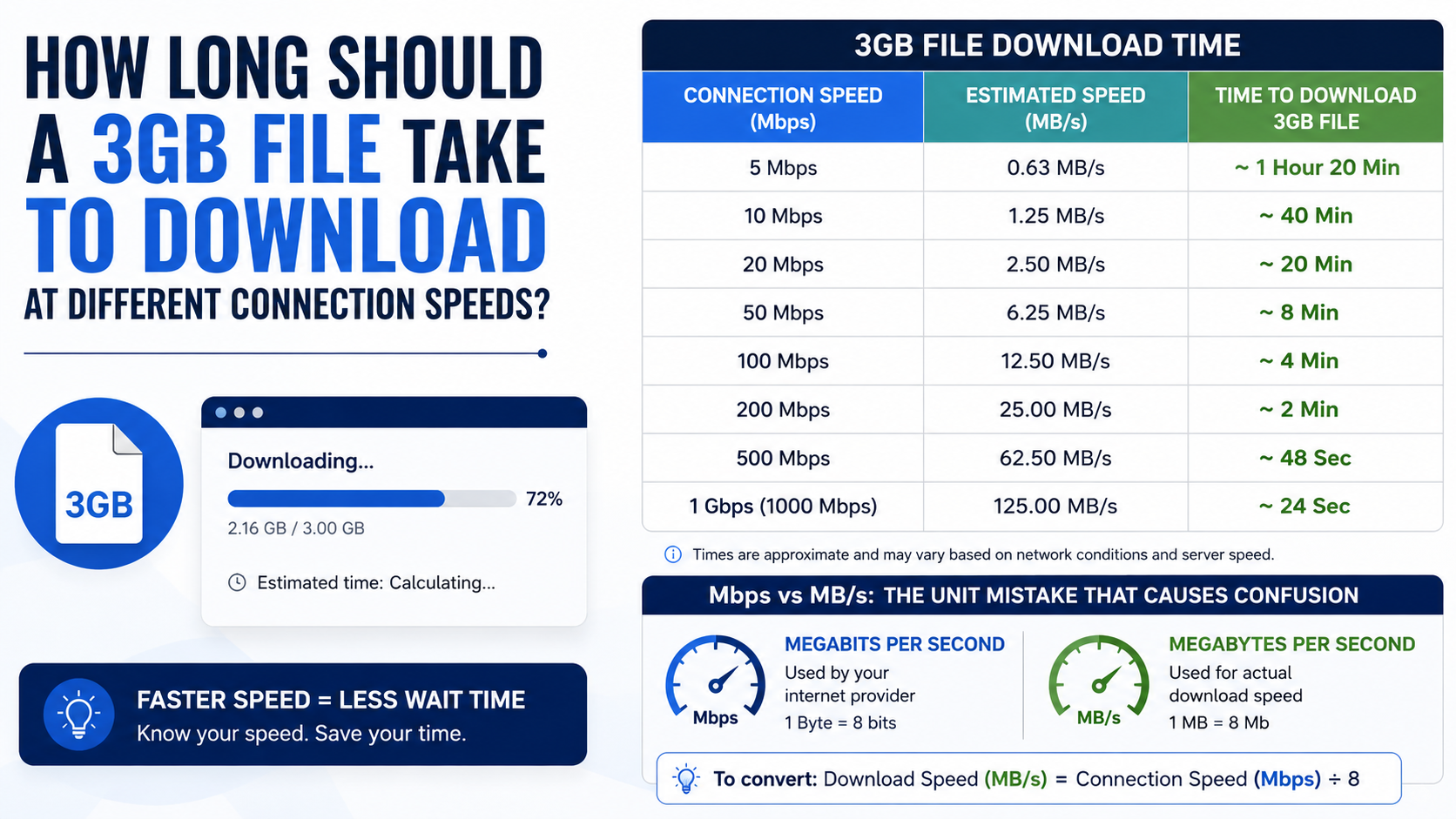
The table below uses the standard decimal calculation: 3GB equals approximately 24,000 megabits, because one byte contains eight bits. NIST defines a byte as eight bits and distinguishes decimal units such as gigabytes from binary units such as gibibytes. NIST unit guidance
| Advertised download speed | Theoretical time for 3GB | More realistic estimate |
|---|---|---|
| 2 Mbps | 3 hours 20 minutes | 3 hours 50 minutes or longer |
| 5 Mbps | 1 hour 20 minutes | 1 hour 30–40 minutes |
| 10 Mbps | 40 minutes | 45–50 minutes |
| 20 Mbps | 20 minutes | 22–25 minutes |
| 25 Mbps | 16 minutes | 18–20 minutes |
| 30 Mbps | 13 minutes 20 seconds | 15–17 minutes |
| 50 Mbps | 8 minutes | 9–10 minutes |
| 100 Mbps | 4 minutes | 4–5 minutes |
| 200 Mbps | 2 minutes | 2–3 minutes |
| 500 Mbps | 48 seconds | 50–60 seconds |
| 1 Gbps (1,000 Mbps) | 24 seconds | 25–35 seconds |
These are estimates, not guarantees. A busy game server, slow cloud host or unstable 5G signal can make a 100 Mbps connection download more slowly than a well-connected 50 Mbps line.
How to Calculate 3GB Download Time
Use this formula:
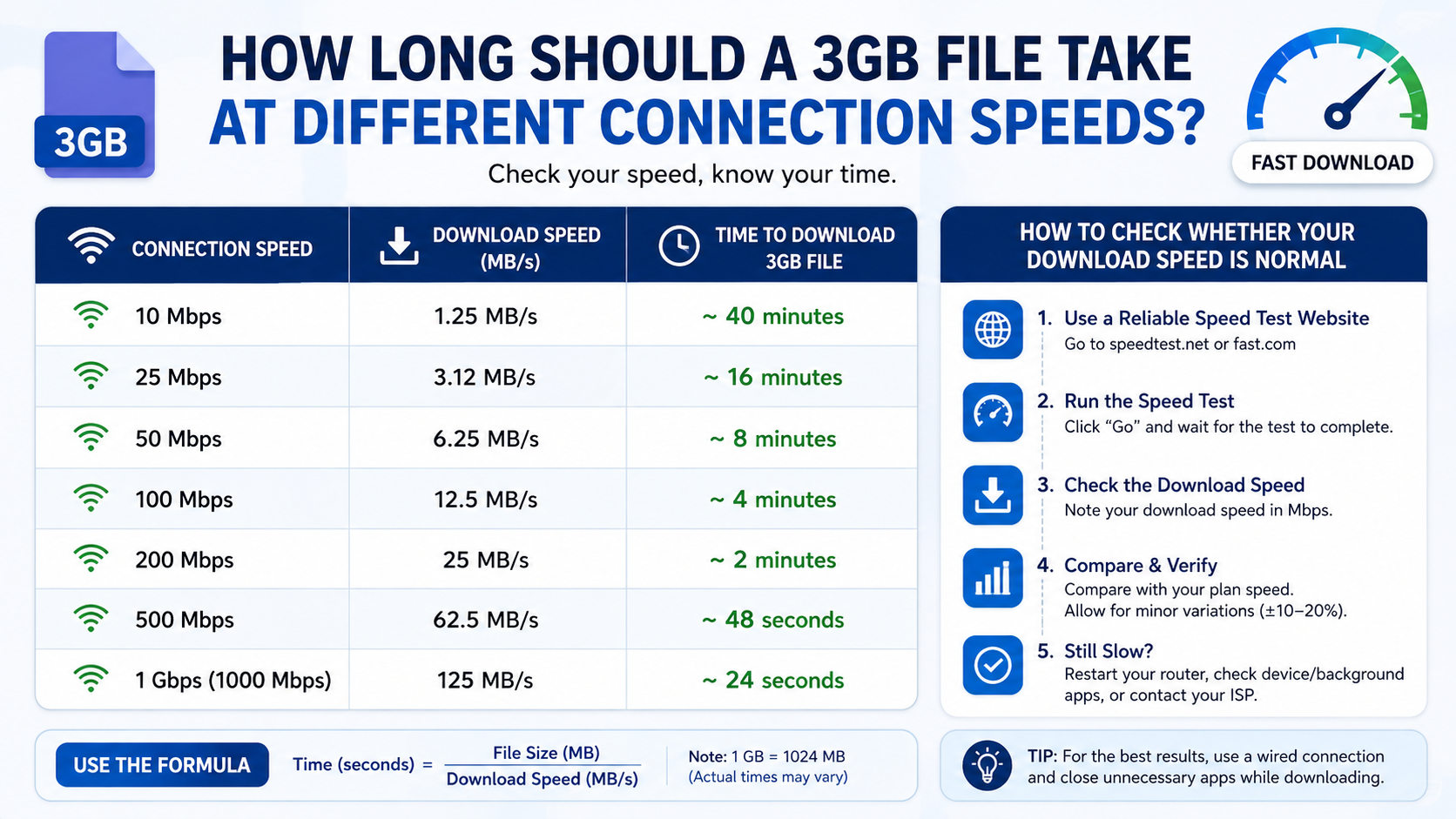
Download time in seconds = File size in megabits ÷ Download speed in MbpsFor a 3GB file:
3GB × 8 × 1,000 = 24,000 megabitsAt 100 Mbps:
24,000 ÷ 100 = 240 seconds
240 seconds ÷ 60 = 4 minutes
This is the ideal result if the connection continuously delivers exactly 100 Mbps to the download server.
A quick example using MB/s
Suppose your browser shows a download rate of 12.5 MB/s. Convert it to megabits per second:
12.5 MB/s × 8 = 100 MbpsA 3GB file at 12.5 MB/s therefore takes about four minutes in ideal conditions.
Mbps vs MB/s: The Unit Mistake That Causes Confusion
Internet providers normally advertise speeds in megabits per second (Mbps). Download managers, browsers and operating systems may display megabytes per second (MB/s).
The capital letter matters:
- b = bit
- B = byte
- 1 byte = 8 bits
- 100 Mbps = 12.5 MB/s
- 50 Mbps = 6.25 MB/s
- 10 Mbps = 1.25 MB/s
Google’s Nest and Wi-Fi documentation also describes internet speed tests in megabits per second (Mbps). Google speed-test guidance
If your 100 Mbps plan downloads at around 10–12 MB/s, that may be normal. It does not mean the connection has dropped to 10 Mbps.
Why Your Actual Download May Take Longer
The theoretical calculation assumes a perfect connection. Real-world downloads are affected by several variables.
Wi-Fi signal and router location
A phone or laptop far from the router may receive a weaker signal. Thick walls, neighbouring Wi-Fi networks and older 2.4GHz equipment can reduce throughput.
For large files, try downloading near the router or use a 5GHz Wi-Fi network. Ethernet is usually more consistent for desktops, gaming PCs and smart TVs.
Server-side limits
Your internet connection may be capable of 100 Mbps, but the website or game server may limit each user to 20 or 30 Mbps. Popular releases can also overload servers.
A download from one server may be slow while another download runs at full speed.
Other devices and applications
Video streaming, cloud backups, online gaming updates and other people using the same connection share available bandwidth. Pause unnecessary transfers before downloading a large file.
Mobile network variation
4G and 5G speeds can change significantly with location, indoor coverage, tower load, spectrum and signal strength. A speed test at noon may not match performance during the evening.
The Indian government reported that average mobile broadband download speed had increased to 132 Mbps in December 2025, based on Ookla data, but an average does not represent the speed available at every location. Press Information Bureau release
Protocol and storage overhead
Downloads include network control data, encryption and connection management. Your device may also need time to write the file to storage, verify it or unpack it after completion.
A nearly full, slow or overheated phone storage system can make the final stage appear stuck.
Is a 3GB Download Large for Indian Mobile Data?
Yes. A 3GB file can use most of a daily mobile-data allowance or a significant portion of a monthly plan.
Before downloading on 4G or 5G:
- Check your remaining data balance in your operator’s app.
- Confirm whether your plan has a daily high-speed limit.
- Use Wi-Fi if the file is not urgent.
- Avoid downloading while your phone is using mobile data unintentionally.
- Keep the phone connected to power if the transfer may take a long time.
“Unlimited” plans may still apply fair-use or speed-throttling conditions. Check the terms shown by your operator rather than assuming unlimited high-speed data.
How to Check Whether Your Download Speed Is Normal
Use a speed-test service on the same device and connection you plan to use for the file.
- Stop streaming and other active downloads.
- Connect to the preferred Wi-Fi network, or use mobile data if that is how you will download.
- Run a speed test such as your ISP’s test, Google’s built-in test results or Fast.com.
- Run the test two or three times at different times.
- Compare the measured download speed with the rate shown by the browser.
A speed test is only a snapshot. Google notes that results depend on the router, Wi-Fi point and current network conditions. Netflix also recommends a stable connection and provides speed guidance ranging from 3 Mbps for HD video to 15 Mbps for 4K streaming. Netflix speed recommendations
What to Do If a 3GB File Is Downloading Too Slowly
Try these steps in order:
- Pause and resume the download. This can reconnect you to a less congested server route.
- Move closer to the router. If possible, switch to 5GHz Wi-Fi or Ethernet.
- Stop other traffic. Pause cloud sync, streaming, torrents and automatic updates.
- Try another download source. Use only a legitimate alternative provided by the publisher or service.
- Restart the router or phone. This can resolve temporary connection problems.
- Check available storage. Keep more than 3GB free because installation and temporary files may require additional space.
- Disable battery-saving restrictions for the download app. Android may pause background transfers to save power.
- Check server status. A slow publisher or game server cannot be fixed by changing your local Wi-Fi.
- Test at another time. Evening congestion is common on shared networks.
- Contact your ISP if speed tests remain far below your subscribed speed.
Do not install an unknown “download accelerator” or modified app simply because a file is slow. Unofficial software can contain malware or change the downloaded file.
How Long Should 3GB Take on Common Indian Connections?
For practical planning:
- Basic 10 Mbps broadband: around 45–50 minutes.
- 25 Mbps fibre plan: roughly 18–20 minutes.
- 50 Mbps home broadband: about 9–10 minutes.
- 100 Mbps fibre: approximately 4–5 minutes.
- 200 Mbps fibre or strong 5G: about 2–3 minutes.
- 500 Mbps fibre: close to one minute.
- 1 Gbps fibre: under half a minute when the server supports that speed.
Your plan speed is not the same as guaranteed speed to every website. Distance to the server, peering arrangements and traffic conditions all matter.
Frequently Asked Questions
How long should 3GB take to download at 10 Mbps?
The ideal time is about 40 minutes. In practice, expect approximately 45–50 minutes, depending on Wi-Fi, server performance and other network use.
How long does a 3GB download take at 50 Mbps?
At a constant 50 Mbps, the theoretical time is 8 minutes. A realistic range is usually 9–10 minutes.
How long should 3GB take at 100 Mbps?
A 3GB file takes about 4 minutes theoretically at 100 Mbps. Real downloads commonly take 4–5 minutes.
Why does my 100 Mbps connection show only 12 MB/s?
That is a normal unit conversion. 100 Mbps equals 12.5 MB/s before overhead. A reading near 10–12 MB/s can therefore indicate full-speed performance.
Does downloading a 3GB file use exactly 3GB of data?
Usually it uses slightly more than the displayed file size because of network overhead. Allow a small safety margin, especially on a capped mobile-data plan.
Can 5G download 3GB faster than fibre?
Sometimes, but not always. A strong 5G connection may exceed some fibre plans, while congestion, indoor signal loss or data limits can make it slower. Compare actual speed tests on your device.
Why did the download finish but installation take longer?
The download is only the transfer stage. The device may need additional time to verify, extract or install the files. Games and software often require extra free storage for these temporary operations.
Is a download time calculator accurate?
It is accurate for the mathematical estimate when the file size and sustained speed are known. It cannot predict server limits, network congestion, Wi-Fi interference or interruptions, so treat the result as a baseline rather than a promise.


