

How to Download a Will or Legal Document From an Online Service Safely in India
If you need to know how to download a will, start with the online service that created it—not a random template website, search advertisement, email attachment, or APK. Sign in through the provider’s official website or app, download the final PDF, verify its contents and origin, and preserve both a digital and physical copy.
Downloading a file is only one part of the process. An online will may be a draft until it is correctly signed and attested. For Indian legal requirements, read the service’s instructions and obtain independent legal advice where your family, assets, or succession issues are complicated.
Key Takeaways
- Download only from the service’s verified website, official mobile app, or authenticated email.
- Check the document name, date, version, page count, personal details, and provider information before signing.
- A downloaded PDF is not automatically an executed or legally effective Will.
- For an ordinary Will, Section 63 of the Indian Succession Act, 1925 generally requires the testator’s signature and attestation by two witnesses.
- Registration is a separate issue; the Registration Act, 1908 includes provisions making registration of Wills optional, but individual circumstances can require professional advice.
- Store the signed original securely and tell the executor or a trusted person where it is kept.
What does “download a will” mean?

Online services use the word “Will” for different products:
- A blank template – a general form requiring substantial editing.
- A generated draft – created from answers you enter into an online questionnaire.
- A lawyer-reviewed document – prepared or checked by a legal professional.
- A final executed Will – signed and attested according to applicable law.
These are not interchangeable. A PDF that displays your name and assets can still be only a draft. Read the provider’s disclaimer, order confirmation, and completion status. Look for labels such as “final,” “draft,” “executed,” or “pending review.”
Indian online services advertise different delivery methods, including an account dashboard, an emailed download link, and direct PDF or DOCX downloads. For example, some providers state that they send the generated document by email, while others allow downloads immediately after payment or completion. Use the method shown inside your own account rather than relying on a third-party guide.
Safest method: download from the official service
Use this short process whenever possible.
1. Open the correct website or app
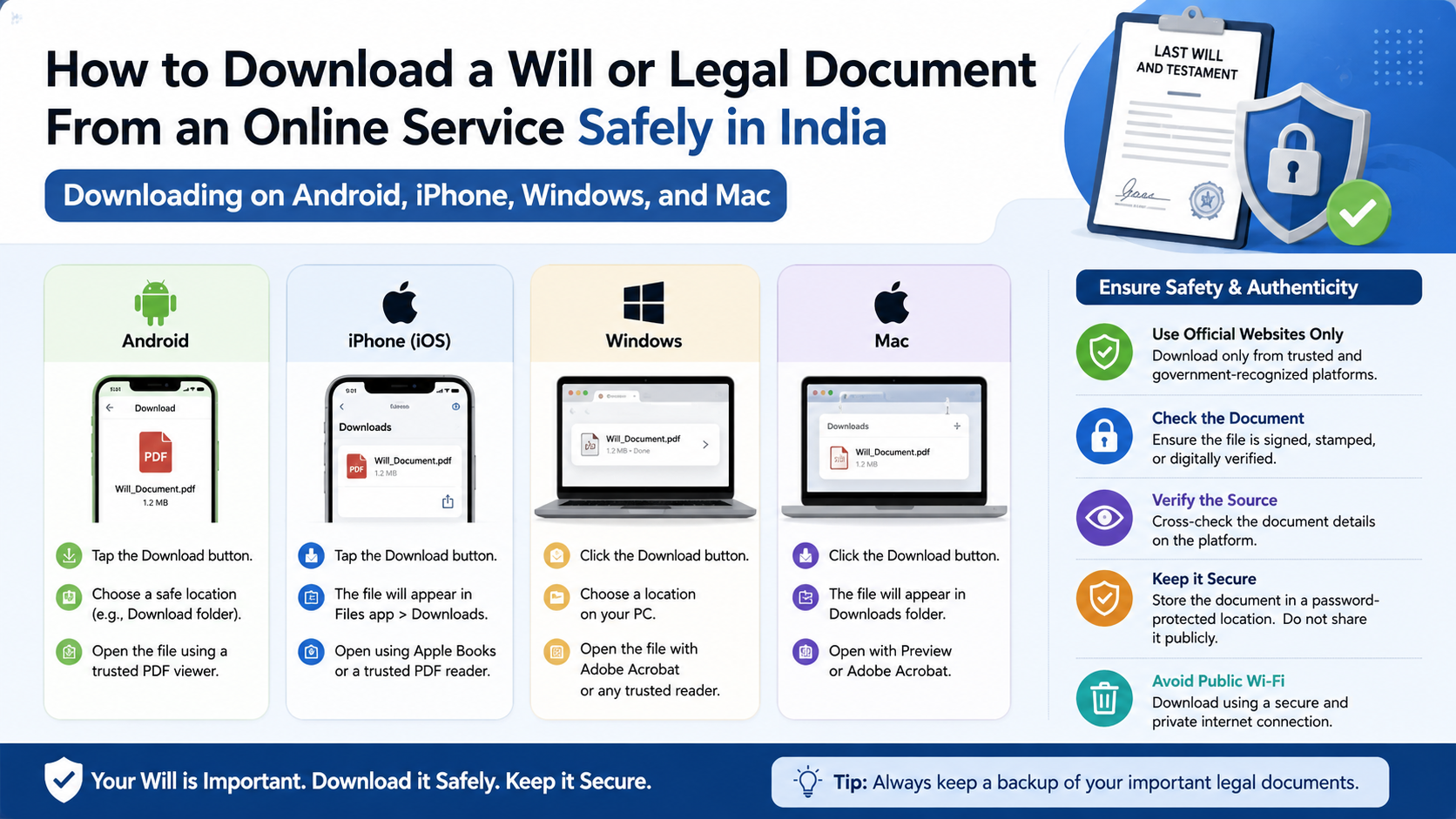
Type the provider’s address yourself, use a saved bookmark, or install the app from Google Play or Apple’s App Store. Check the spelling of the domain and confirm that the page uses HTTPS.
Avoid clicking links in unsolicited SMS, WhatsApp messages, social-media posts, or advertisements that claim your Will is “ready” or that your account will be suspended. A look-alike domain can collect your login, card details, or identity documents.
2. Sign in through the normal account page
Use the same email address or phone number used to create the document. Enter a one-time password only on the provider’s genuine login page. Never share an OTP with a caller or support agent.
If the service supports two-factor authentication, enable it. Do not allow a remote-support app or screen-sharing session merely to help you download a file.
3. Find the document area
Common labels include:
- My documents
- Completed documents
- Downloads
- Order history
- Documents and forms
- Download final PDF
Confirm that the document belongs to the correct account and order. If there are multiple versions, select the latest one that has been marked complete or approved.
4. Download the file
Tap or click Download PDF (or the equivalent button). A normal legal-document download usually produces a .pdf file. If a provider offers DOCX as an editable format, download it only when you specifically need to make changes; preserve the final PDF separately.
Do not install an APK, browser extension, “PDF unlocker,” or unknown program to open a document. On a computer, open the file with a current PDF reader. On Android or iPhone, use the built-in Files or document viewer, or a reputable PDF app from the official store.
5. Save it in a controlled location
Use a clear filename, for example:
Will_Rajesh-Kumar_2026-08-23_Draft.pdf
Avoid saving the only copy in a public Downloads folder, a shared office computer, or an unprotected messaging chat. After saving, open the file from the folder to confirm that it is not corrupted.
How to verify the downloaded PDF
Before printing or signing, compare the file with the information you submitted.
Check:
- Testator’s full legal name, address, age, and identification details
- Names and relationships of beneficiaries
- Executor and guardian details, where applicable
- Property descriptions, account references, and ownership information
- Revocation clauses, residuary clause, and special instructions
- Page numbers and the total number of pages
- Date, document version, provider name, and lawyer-review status
- Missing pages, blank fields, strange symbols, or formatting changes
Read the entire document, not just the first page. A spelling error in a name, an incorrect survey number, or an omitted beneficiary can create serious confusion later. Ask the service to correct errors before execution; do not silently edit a lawyer-reviewed PDF unless you understand the legal effect.
A digital signature, watermark, QR code, or “legally valid” badge does not by itself prove that the document is appropriate for your circumstances. If the service provides a verification page or document ID, enter the ID on the provider’s official website—not on an unrelated verification link.
Does a downloaded Will become legally valid automatically?
No. Downloading creates a file; it does not necessarily complete execution.
For an ordinary (unprivileged) Will, Section 63 of the Indian Succession Act, 1925 describes signing by the testator and attestation by two or more witnesses. Each witness must see the testator sign (or acknowledge the signature) and sign in the testator’s presence. Read the current text on India Code.
Practical execution usually involves:
- Print the complete, unaltered document.
- Confirm that the testator understands the document and is signing voluntarily.
- Have the testator sign where indicated.
- Have two suitable witnesses attest as instructed, in the required presence.
- Add dates, initials, or identification details only where the document or lawyer instructs.
- Keep the signed original intact.
Witness eligibility and execution details can vary with the facts and the applicable personal law. A beneficiary should generally not be used as a witness without legal advice, because an interested witness can create avoidable disputes.
Registration is different from signing and witnessing. The Registration Act, 1908 contains provisions on optional registration and deposit of Wills. Whether registration, probate, notarisation, medical evidence, or other steps are advisable depends on the person, assets, religion, location, and potential disputes. Ask an Indian advocate or the relevant Sub-Registrar’s office for advice rather than assuming an online provider’s statement applies to everyone.
Protect your privacy while downloading
A Will can reveal property, bank accounts, family relationships, identity numbers, and inheritance wishes. Treat it as highly confidential.
- Use a private, updated device and a trusted network. Avoid public Wi-Fi for account access.
- Check the service’s privacy policy, retention period, deletion process, and data-sharing terms.
- Do not upload the PDF to free “PDF converter,” “compressor,” or AI websites unless you understand how they handle files.
- Use a strong, unique account password and enable two-factor authentication.
- Encrypt the file or place it in a password-protected folder. Keep the password separately from the document.
- Do not email an unprotected copy to a large group or forward it through public WhatsApp groups.
- Keep one secure backup on an encrypted drive or trusted cloud account, and test that the backup opens.
A password-protected PDF can be useful for storage, but do not make the only copy inaccessible to the executor. Record safe access instructions separately.
Downloading on Android, iPhone, Windows, and Mac
| Device | Safe approach | Where to check the file |
|---|---|---|
| Android phone/tablet | Use the official browser or provider app; grant only necessary permissions | Files app → Downloads or the provider’s named folder |
| iPhone/iPad | Tap Download, then choose Save to Files; select an iCloud Drive or On My iPhone folder | Files app → Browse → chosen folder |
| Windows PC | Use the provider’s website and a current PDF reader; avoid executable downloads | File Explorer → Downloads |
| macOS | Download through Safari or another updated browser and save to a private folder | Finder → Downloads |
If a mobile browser opens a preview instead of saving the file, use the share or download icon and choose Save to Files (iPhone) or Download/Open with Files (Android). On a computer, right-clicking the provider’s download button and choosing “Save link as” can help when a normal click fails—but confirm that the link still belongs to the official domain.
Common download problems and fixes
The download button does nothing
Allow pop-ups for the provider’s site, disable an over-aggressive content blocker temporarily, or try an updated browser. Do not disable your antivirus or install an unknown helper program.
The PDF is blank or will not open
Download it again using a stable connection. Check the file size; a file of only a few kilobytes may be an error page saved as a PDF. Try a reputable PDF reader and ask the provider to regenerate the document if the problem continues.
The link has expired
Sign in to the dashboard and generate a fresh link. Contact support through the email address or phone number shown on the official website. Never pay a “reactivation fee” to an unverified caller.
You cannot find the email
Search for the provider’s name, “document,” “Will,” or “download,” and check spam and promotions folders. Verify that you are checking the email account used during registration.
Your details are incorrect
Do not sign, print, or distribute the file. Request a corrected version and retain the previous file only if the provider or lawyer advises you to keep an audit copy.
You suspect a scam
Stop communicating, do not open further attachments, and change your password if you entered it on a suspicious page. In India, report cybercrime through the National Cyber Crime Reporting Portal or call 1930 promptly, as advised by the portal.
A sensible storage plan after signing
Keep the original signed Will in a fire- and water-resistant location, such as a secure home safe or a professional custody arrangement. Store a scanned PDF as a backup, but do not treat the scan as a replacement for the original where the original is required.
Tell the executor—or another trusted person—where the original is located and how to contact the drafting service or lawyer. Review the Will after major events such as marriage, divorce, a child’s birth, a property sale, or a significant change in assets. When replacing a Will, follow legal advice on revocation and destroy or clearly mark superseded copies to prevent confusion.
Frequently Asked Questions
Can I download a Will for free?
Some services offer free templates or drafts, while others charge for document generation, legal review, storage, or printing. Confirm the total price, taxes, renewal terms, and refund policy on the provider’s official page before entering payment details.
Is a PDF Will legally valid in India?
A PDF is a format, not a guarantee of validity. The document normally needs proper signing and attestation, and its clauses must suit the testator’s circumstances. Obtain legal advice for complex estates, joint or ancestral property, overseas assets, disputed family situations, or questions about capacity.
Should I download PDF or Word format?
Use PDF as the stable, print-ready copy. Download DOCX only for permitted editing before finalisation. Never edit an executed Will; prepare a new document and obtain advice on revocation if changes are needed.
Can I store my Will in DigiLocker?
DigiLocker can be useful for storing copies of documents, but an online copy does not replace the signed original or prove that execution requirements were met. Check the service’s current terms and keep the original safely accessible.
Is online registration required after downloading?
Not automatically. Registration, if chosen or advised, is a separate process under the applicable law and local registration practice. Contact the relevant Sub-Registrar or an advocate for current, fact-specific guidance.
What if the online service closes?
Keep your downloaded files, payment receipt, order number, and support correspondence. Maintain an offline backup and ensure your executor knows where the signed original is stored.
Can I send the downloaded Will on WhatsApp?
You can send a copy when necessary, but WhatsApp is not ideal for long-term confidential storage. Use end-to-end encrypted sharing with trusted recipients, avoid group chats, and retain the signed original in secure custody.
How do I know a download link is genuine?
Open the provider’s website independently and sign in from there. Check the domain carefully, avoid urgent payment requests, and contact support using details published on the official site—not details supplied only in the suspicious message.



