

How Long Will It Take to Download 100GB at 60Mbps? Exact Time Calculation
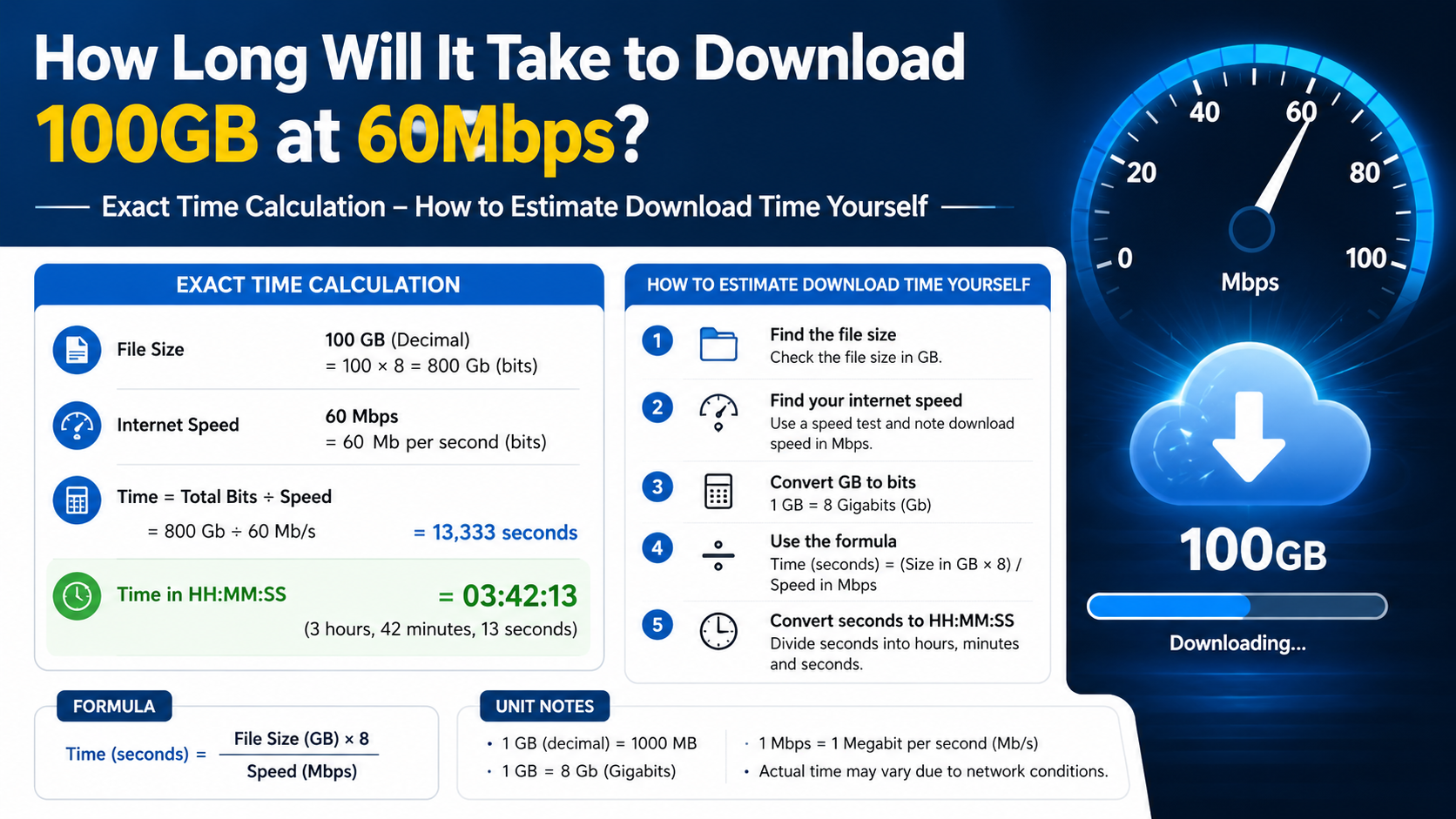
If your internet connection maintains a download speed of 60 Mbps, downloading a 100 GB file takes approximately 3 hours, 42 minutes, and 13 seconds under ideal conditions.
In real use, the same download may take around 4 to 4.5 hours because of Wi-Fi limitations, server speed, network congestion, protocol overhead, and other devices using the connection.
Key Takeaways
- Ideal time for 100 GB at 60 Mbps: approximately 3 hours 42 minutes 13 seconds.
- 60 Mbps equals a maximum theoretical transfer rate of 7.5 MB/s.
- A 100 GiB file, measured using binary units, takes approximately 3 hours 58 minutes 37 seconds.
- Real-world download time is commonly longer than the mathematical estimate.
- At a steady 60 Mbps, every 1 GB takes about 2 minutes 13 seconds.
- You can check your actual connection using the official TRAI MySpeed portal.
Exact Calculation: 100GB at 60Mbps
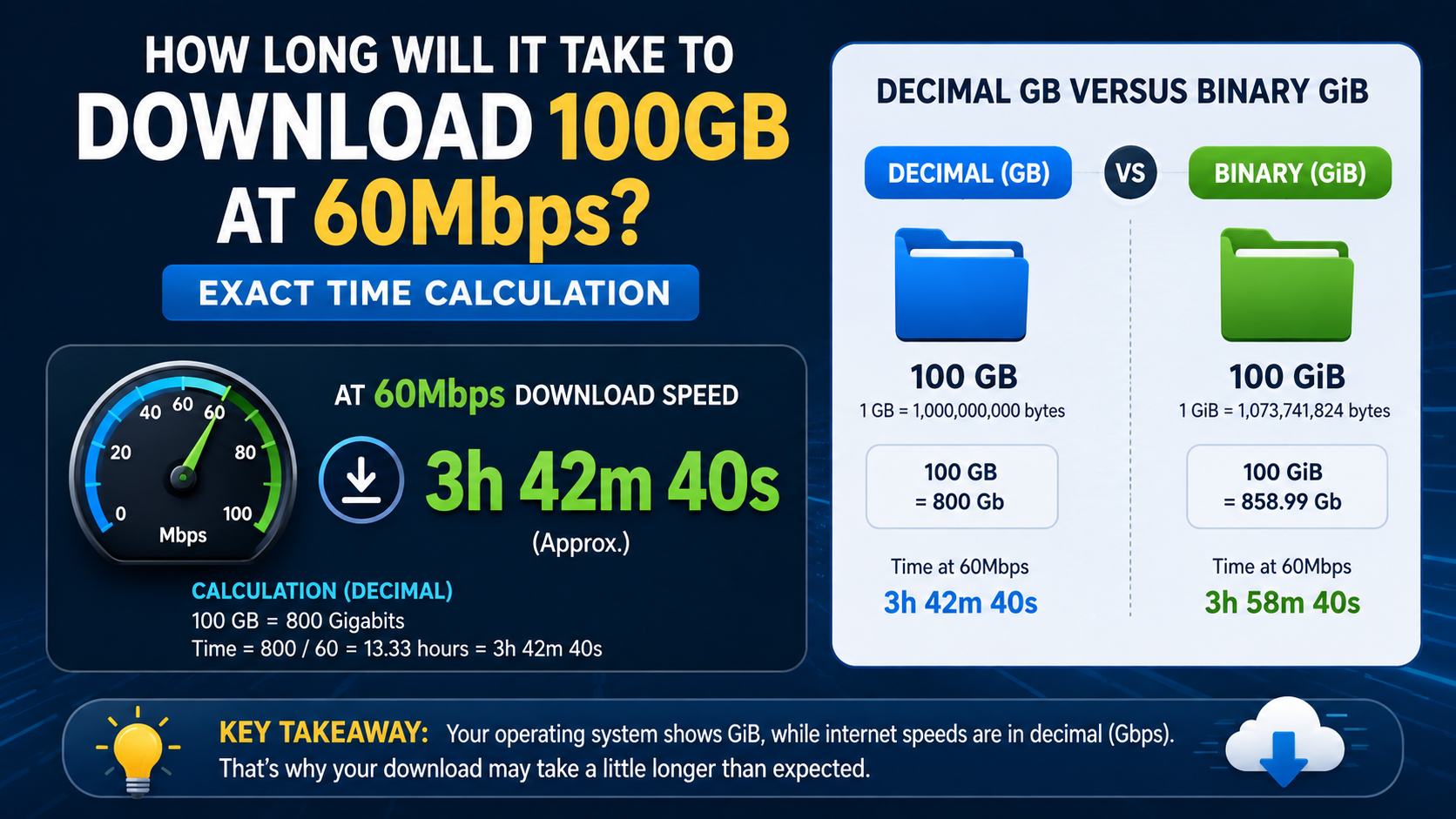
Internet providers normally advertise speed in megabits per second (Mbps), while file sizes are usually shown in gigabytes (GB). Since one byte contains eight bits, the first step is converting gigabytes into bits.
Step 1: Convert 100GB to bits
Using decimal units:
- 1 GB = 1,000,000,000 bytes
- 100 GB = 100,000,000,000 bytes
- 1 byte = 8 bits
- 100 GB = 800,000,000,000 bits
Step 2: Divide the file size by the speed
\[
\text{Time in seconds} = \frac{800,000,000,000\text{ bits}}{60,000,000\text{ bits per second}}
\]
\[
\text{Time} = 13,333.33\text{ seconds}
\]
Step 3: Convert seconds into hours
13,333.33 seconds equals:
- 222.22 minutes
- 3 hours
- 42 minutes
- 13 seconds
Therefore:
100GB at 60Mbps takes approximately 3 hours, 42 minutes, and 13 seconds in ideal conditions.
Mbps is a data-transfer rate measured in millions of bits per second; the NIST Mbps glossary uses this standard meaning.
Why 60Mbps Equals 7.5MB/s
A common source of confusion is the difference between Mbps and MB/s:
- Mbps = megabits per second
- MB/s = megabytes per second
- 1 byte = 8 bits
To convert 60 Mbps to megabytes per second:
\[
60 \div 8 = 7.5\text{ MB/s}
\]
So, a 60 Mbps connection can theoretically download data at 7.5 megabytes per second.
At that rate:
\[
100,000\text{ MB} \div 7.5\text{ MB/s} = 13,333.33\text{ seconds}
\]
This produces the same result of approximately 3 hours 42 minutes.
Remember the capital letter:
- 60 Mbps is not the same as 60 MB/s.
- 60 MB/s would represent a connection eight times faster than 60 Mbps.
Decimal GB Versus Binary GiB
The displayed size of a large game, backup, video archive, or software package can vary depending on how storage units are calculated.
Decimal calculation
Storage manufacturers and many download services use decimal units:
- 1 GB = 1,000,000,000 bytes
- 100 GB at 60 Mbps = 3 hours 42 minutes 13 seconds
Binary calculation
Some operating systems use binary units:
- 1 GiB = 1,073,741,824 bytes
- 100 GiB = 107,374,182,400 bytes
At 60 Mbps:
\[
\frac{107,374,182,400 \times 8}{60,000,000}
= 14,316.56\text{ seconds}
\]
That equals approximately 3 hours 58 minutes 37 seconds.
The difference is about 16 minutes. If a download screen says 100 GB but your computer reports approximately 93.1 GiB, this is generally a unit-conversion difference rather than missing data.
Real-World Download Time at 60Mbps
The 3-hour-42-minute figure assumes that your connection delivers a constant 60 Mbps from beginning to end. Actual throughput is rarely perfectly stable.
A practical estimate is:
| Sustained efficiency | Approximate time for 100GB |
|---|---|
| 100% (theoretical maximum) | 3h 42m |
| 95% | 3h 54m |
| 90% | 4h 07m |
| 85% | 4h 21m |
| 80% | 4h 38m |
| 70% | 5h 18m |
For many Indian home broadband connections, planning for about 4 to 4.5 hours is sensible if a speed test consistently shows close to 60 Mbps.
The actual result depends on:
- The download server’s capacity
- Distance and routing to the server
- Wi-Fi signal strength
- Router performance
- Ethernet versus wireless connection
- Other users and devices on the network
- VPN or proxy use
- Peak-hour congestion
- Background updates and cloud synchronisation
- The download client’s speed limits
- Temporary ISP issues
A connection may show 60 Mbps in a speed test while a particular game launcher or website delivers less because that server is busy or geographically distant.
Quick Reference: Download Times for Different File Sizes
At a constant 60 Mbps (7.5 MB/s), these are the ideal download times:
| File size | Ideal download time |
|---|---|
| 1 GB | 2m 13s |
| 5 GB | 11m 07s |
| 10 GB | 22m 13s |
| 25 GB | 55m 33s |
| 50 GB | 1h 51m 07s |
| 75 GB | 2h 46m 40s |
| 100 GB | 3h 42m 13s |
| 150 GB | 5h 33m 20s |
| 200 GB | 7h 24m 27s |
These figures use decimal gigabytes and assume the full 60 Mbps is available to the download.
How to Estimate Download Time Yourself
Use this formula:
\[
\text{Time in seconds} =
\frac{\text{File size in GB} \times 8,000,000}{\text{Speed in Mbps}}
\]
For a simpler estimate in minutes:
\[
\text{Time in minutes} =
\frac{\text{File size in GB} \times 133.33}{\text{Speed in Mbps}}
\]
For example, a 40 GB game at 60 Mbps:
\[
40 \times 133.33 \div 60 = 88.89\text{ minutes}
\]
That is approximately 1 hour 29 minutes under ideal conditions.
To estimate a more realistic time, divide the result by your expected efficiency. If you expect 85% efficiency:
\[
\text{Realistic time} =
\frac{\text{Ideal time}}{0.85}
\]
How to Make a 100GB Download Finish Faster
You cannot download faster than the connection and server allow, but these steps can reduce avoidable slowdowns:
- Use a wired Ethernet connection.
Ethernet generally provides a more consistent connection than a distant or crowded Wi-Fi network.
- Use the 5 GHz or 6 GHz Wi-Fi band when nearby.
These bands can be faster, although walls and distance reduce their range.
- Pause other heavy traffic.
Stop cloud backups, streaming, torrents, other game downloads, and large uploads.
- Choose a nearby or official mirror.
A geographically closer server may provide better throughput, but download only from a legitimate source.
- Disable unnecessary VPN routing.
A VPN can add distance and congestion. Do not disable security controls if your organisation requires them.
- Keep the device connected to power.
Laptops and phones may reduce network or processing performance in battery-saving modes.
- Check the launcher’s bandwidth settings.
Steam, Epic Games Launcher, browsers, and other clients may have download limits enabled.
- Avoid repeated pauses if the server does not resume reliably.
Some services restart or re-check large downloads after interruption.
If the download is a game or application, allow additional time for installation, unpacking, verification, and updates after the file transfer completes.
How to Check Whether Your 60Mbps Connection Is Working Properly in India
Run a speed test while:
- Using the same device that performs the download
- Connecting to the preferred router band
- Pausing other downloads
- Testing at different times of day
TRAI says providers must publish typical download and upload speeds in tariff information, and consumers can measure performance through the TRAI MySpeed app and portal. TRAI also notes that it does not prescribe one universal minimum download speed for every broadband plan; the advertised plan terms and declared typical speed matter.
If repeated tests are far below your plan’s declared typical speed:
- Test with Ethernet if possible.
- Restart the router and test again.
- Check whether other devices are consuming bandwidth.
- Record several results, including the date and time.
- Contact your ISP and request a technical complaint number.
A single low result does not prove a permanent fault. A pattern across multiple tests is more useful evidence.
Frequently Asked Questions
How long will it take to download 100GB at 60Mbps?
The ideal time is 3 hours, 42 minutes, and 13 seconds. In normal conditions, expect roughly 4 to 4.5 hours, depending on network and server performance.
Is 60Mbps fast enough to download a 100GB game?
Yes, but it is a large transfer. Plan for at least four hours, and allow extra time for installation, file verification, patches, and possible speed fluctuations.
Why does my download show 7MB/s instead of 60Mbps?
That is expected. 60 Mbps converts to a theoretical maximum of 7.5 MB/s. Download clients often show megabytes per second, while ISPs advertise megabits per second.
Does Wi-Fi make a 100GB download slower?
It can. Weak signal, interference, an overloaded router, or the slower 2.4 GHz band may reduce throughput. Ethernet is usually the most consistent option.
How much data will downloading 100GB consume?
Approximately 100GB of download allowance, plus a small amount of protocol and service overhead. If your Indian broadband plan has a fair-use limit, check its terms before starting.
Can a VPN change the download time?
Yes. Encryption, extra routing distance, and an overloaded VPN server can reduce speed. The effect varies by VPN provider, location, and network.
What if the file is 100GiB rather than 100GB?
A 100 GiB file takes approximately 3 hours, 58 minutes, and 37 seconds at a constant 60 Mbps, about 16 minutes longer than a decimal 100GB file.
Why is the estimated time constantly changing?
Download estimates respond to current throughput. If speed rises or falls because of Wi-Fi, server load, congestion, or other traffic, the remaining-time calculation changes as well.


