

How to Download a National ID Digital Copy From the Official Portal (e-Aadhaar)
For India, the official digital copy of the national identity document is e-Aadhaar, a password-protected PDF digitally signed by the Unique Identification Authority of India (UIDAI). You can download it from the MyAadhaar portal using your Aadhaar number, Enrolment ID (EID) or Virtual ID (VID). A one-time password (OTP) is sent to the mobile number registered with Aadhaar.
Key Takeaways
- Download e-Aadhaar only through UIDAI’s MyAadhaar portal or the official mAadhaar app.
- You can use a 12-digit Aadhaar number, 28-digit EID or 16-digit VID.
- OTP verification requires access to the mobile number registered with Aadhaar.
- The PDF password is usually the first four characters of your name in CAPITAL letters followed by your birth year.
- Masked Aadhaar hides the first eight digits and displays only the last four.
- e-Aadhaar is legally valid like the physical Aadhaar letter when digitally verified.
What You Need Before Downloading e-Aadhaar

Keep the following ready:
- Your Aadhaar number, Enrolment ID (EID) or Virtual ID (VID).
- Access to the mobile phone registered with your Aadhaar.
- A stable internet connection.
- The name and date-of-birth details recorded in Aadhaar, for opening the PDF.
- A PDF reader such as Adobe Acrobat Reader on your phone or computer.
An EID is printed on the enrolment acknowledgement slip. It includes the enrolment number, date and time in the format required by UIDAI. A VID is a temporary, revocable 16-digit number mapped to your Aadhaar and can be used instead of the Aadhaar number for supported authentication services.
If you do not remember your Aadhaar number or EID, use UIDAI’s Retrieve Lost or Forgotten UID/EID service. You must enter your name, registered mobile number or email address, captcha and OTP.
How to Download National ID Digital Copy Online
The following is the shortest official method.
- Open the UIDAI MyAadhaar download page.
- Select the identification method available to you:
- Aadhaar Number
- Enrolment ID (EID)
- Virtual ID (VID)
- Enter the selected number without unnecessary spaces.
- Enter the security code or captcha shown on the screen.
- Select Send OTP.
- Enter the OTP received on your registered mobile number.
- If shown, select Do you want a masked Aadhaar?
- Complete the download request.
- Save the e-Aadhaar PDF to a private folder on your device.
The exact wording or layout of buttons may change as UIDAI updates its website, but the process remains based on an identity number, captcha and registered-mobile OTP.
Aadhaar Number Method
Choose this option if you know your 12-digit Aadhaar number. Enter the number, captcha and OTP, then download the PDF. This is normally the quickest route.
Enrolment ID Method
Choose EID if your Aadhaar was recently enrolled or updated and you still have the acknowledgement slip. Enter the complete EID details exactly as printed, including the date and time components where requested.
If your Aadhaar has not yet been generated, the portal may show a status message instead of offering a downloadable card. Check the enrolment or update status first.
Virtual ID Method
A VID is useful when you do not want to enter your Aadhaar number directly. Generate or retrieve a VID through UIDAI’s official services, then use it on the e-Aadhaar download page if the option is available.
A VID cannot be used to derive the underlying Aadhaar number. It can be regenerated, and an older VID may become invalid after replacement.
How to Open the Downloaded e-Aadhaar PDF
The e-Aadhaar file is password protected. UIDAI states that the password is generally:
First four characters of your name in CAPITAL letters + year of birth (YYYY)
Examples:
| Name on Aadhaar | Year of birth | PDF password |
|---|---|---|
| Suresh Kumar | 1990 | SURE1990 |
| Sai Kumar | 1990 | SAIK1990 |
| Ria | 1990 | RIA1990 |
| P. Kumar | 1990 | P.KU1990 |
Use the name exactly as recorded in Aadhaar. If the name contains initials, spaces or punctuation, try the first four characters as displayed in the Aadhaar record. Do not share the password with an untrusted person.
After opening the PDF, check your name, photograph, date of birth, address and Aadhaar number. The document includes a digitally signed component and a QR code that can be used for verification.
What Is Masked Aadhaar?
Masked Aadhaar is an e-Aadhaar version in which the first eight digits are replaced with “xxxx-xxxx”; only the last four digits remain visible. It is useful when an organisation needs to check your identity but does not require your full Aadhaar number.
Before sharing a copy, ask the organisation why it needs Aadhaar and whether a masked copy, VID or another accepted identity document is sufficient. Do not assume that every private business is authorised to retain a photocopy of Aadhaar.
UIDAI has advised residents to avoid casually sharing Aadhaar copies and to use masked Aadhaar where appropriate. Read the UIDAI guidance on protecting Aadhaar information.
Is e-Aadhaar Valid Like the Physical Card?
Yes. UIDAI describes e-Aadhaar as a digitally signed electronic copy of the Aadhaar letter and states that it is equally valid for purposes for which Aadhaar is accepted. The UIDAI e-Aadhaar FAQ confirms that residents can download it from MyAadhaar or the official mobile application.
An organisation may still have its own document-format requirements. For example, it may ask for a masked copy, an Aadhaar verification result, an original document for inspection or a different identity document under its rules. If a recipient questions the PDF, use the QR code or UIDAI verification service rather than editing the document.
Downloading e-Aadhaar on a Phone
You can download the digital copy using a mobile browser:
- Open Chrome, Safari or another current browser.
- Visit the official MyAadhaar URL.
- Complete the Aadhaar, EID or VID and OTP process.
- Tap the download icon or open the downloaded file from your browser’s downloads folder.
- Move the PDF to a secure location and avoid sending it through unsecured public groups.
UIDAI also provides Aadhaar services through the official mAadhaar application. Install apps only from the Google Play Store or Apple App Store and check that the publisher is UIDAI. Avoid APK files shared on messaging groups or download websites.
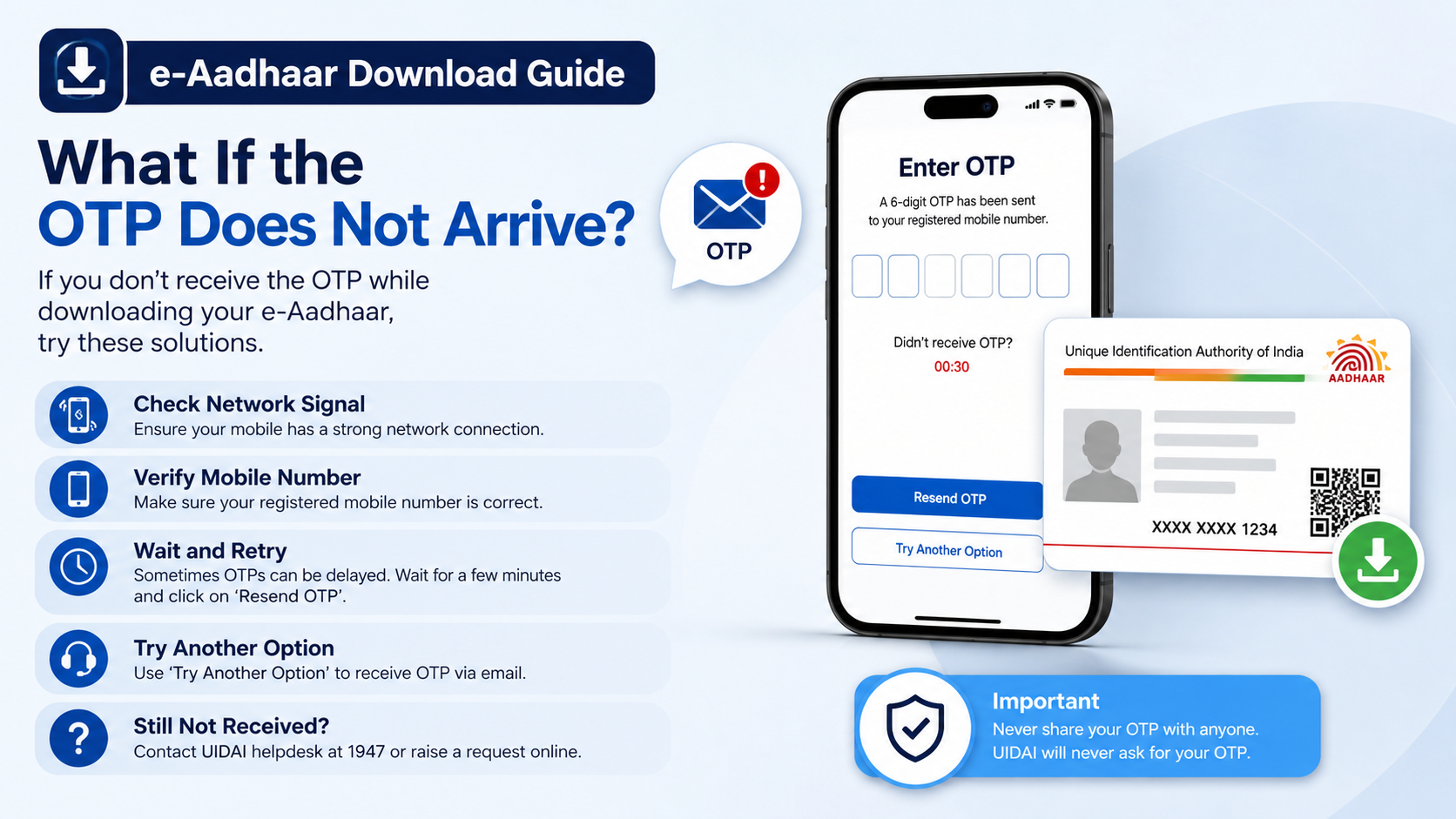
What If the OTP Does Not Arrive?
Try these checks:
- Confirm that the mobile network is working and SMS inbox storage is not full.
- Wait briefly before requesting another OTP; repeated requests can invalidate earlier codes.
- Check that the mobile number is the one registered with Aadhaar.
- Enter the newest OTP only.
- Try the portal again using a private browser window or another supported browser.
- Disable an active VPN if the page or captcha is failing.
If your mobile number is not registered or is no longer accessible, online download may not work. UIDAI says mobile-number updates must be completed at an Aadhaar Enrolment Centre. Locate a centre through the Bhuvan Aadhaar centre locator.
Common e-Aadhaar Download Problems
“Details do not match”
Check the number format and ensure you have entered the correct EID, Aadhaar number or VID. For EID downloads, copy the date and time exactly from the acknowledgement slip.
Aadhaar has not been generated
Use UIDAI’s status service. An enrolment slip alone does not prove that Aadhaar generation is complete. Once generation succeeds, the download option should become available.
PDF will not open
Download the file again from MyAadhaar and open it with an up-to-date PDF reader. Enter the password in CAPITAL letters and include the four-digit birth year. Do not rename the file before testing the password.
Website is unavailable
UIDAI services may experience maintenance or temporary traffic problems. Wait and retry from the official portal instead of using a third-party “Aadhaar download” website.
You downloaded it on a public computer
UIDAI has advised against using public computers or internet cafés for e-Aadhaar downloads. If unavoidable, permanently delete the PDF, empty the recycle bin and clear the browser’s download history before leaving.
Safer Ways to Store and Share the Digital Copy
- Keep one copy in an encrypted device folder or a trusted secure cloud account.
- Use a strong device lock and do not leave the PDF in a public downloads folder.
- Share masked Aadhaar when the full number is unnecessary.
- Add a purpose and date watermark if an organisation accepts it, but never alter official fields, QR codes or digital signatures.
- Do not post the PDF, Aadhaar number, OTP or PDF password on social media.
- Verify the recipient’s identity before sending the document by email or messaging app.
For offline identity verification, UIDAI also offers an Aadhaar Paperless Offline e-KYC service, which produces a digitally signed ZIP/XML package protected by a share code. This is different from the ordinary e-Aadhaar PDF and should be used only when the receiving organisation supports it.
Frequently Asked Questions
Can I download e-Aadhaar without a registered mobile number?
Usually, no. The MyAadhaar download process requires OTP authentication on the registered mobile number. If you cannot access that number, visit an Aadhaar Enrolment Centre to update it or request a print service after biometric authentication.
Can I use my EID to download a digital Aadhaar copy?
Yes. UIDAI supports download using an Enrolment ID, provided the Aadhaar has been generated and the EID details are entered correctly.
What is the difference between e-Aadhaar and a scanned Aadhaar card?
e-Aadhaar is generated by UIDAI as a digitally signed, password-protected PDF. A scanned image is simply a copy of a paper document and does not provide the same digital-signature and QR-code features.
Is masked Aadhaar accepted everywhere?
Acceptance depends on the organisation and the service. Masked Aadhaar is appropriate where the recipient does not need your full number, but some regulated services may require another form of verification.
I forgot my Aadhaar number. How can I retrieve it?
Use UIDAI’s Retrieve UID/EID service with your registered mobile number or email and OTP. If neither is linked or accessible, contact UIDAI at 1947 or visit an Aadhaar Enrolment Centre.
Is there a charge for downloading e-Aadhaar online?
UIDAI’s online e-Aadhaar download is provided through the official portal. A centre may charge for assisted services such as printing or biometric retrieval; confirm the applicable fee at the centre.
Can I print the downloaded PDF?
Yes. You may print e-Aadhaar for organisations that accept a printed copy. Keep the original PDF unchanged so its digital signature and QR code remain available for electronic verification.
Where should I download the digital copy?
Use only the official UIDAI MyAadhaar portal or UIDAI’s official mobile application. Do not use unofficial websites, modified apps or APK mirrors that ask for your Aadhaar number, OTP or payment.




