How to See What Apps You Have Downloaded and Find Old App Installations
If you are trying to remember an app you deleted, move apps to a new phone, or check whether an app was installed before, your app store account keeps the answer. The quickest method is to open the official app store, sign in with the account used for the original download, and open its library or purchase history.
This guide explains how to see what apps you have downloaded on Android, iPhone, iPad, Windows, and Mac, plus what to do when an old app is missing.
Key Takeaways
- Android users can open Google Play Store > profile picture > Manage apps & device > Manage > Not installed.
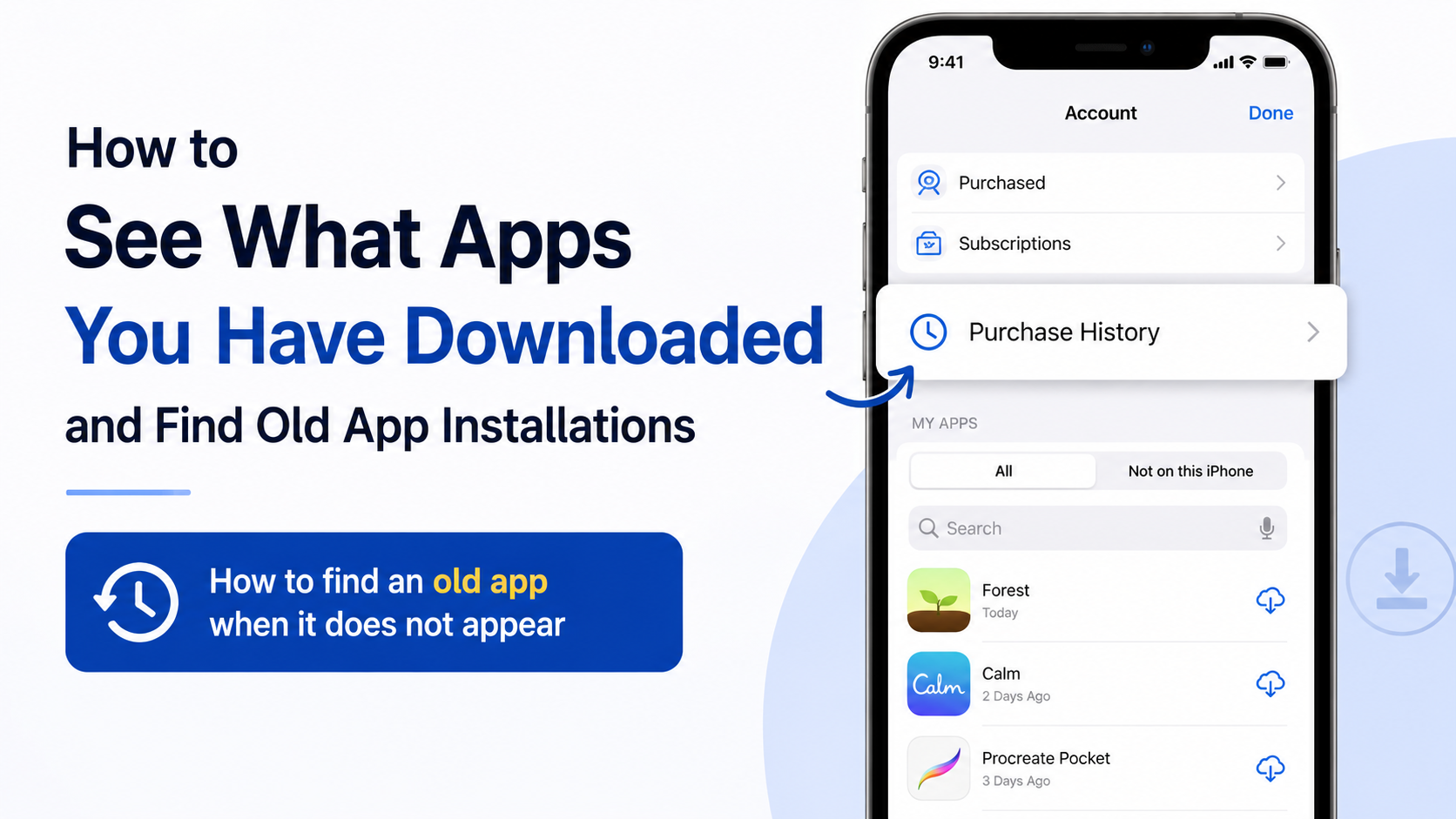
- iPhone and iPad users can check App Store > profile picture > Apps or Purchase History.
- Windows users can open Microsoft Store > Library > My Library, or check Microsoft account order history.
- App history is linked to your Google Account, Apple Account, or Microsoft account—not only to one device.
- Apps downloaded through APK files, websites, messaging apps, or alternative stores may not appear in the official store history.
- A missing app may have been removed, restricted in India, hidden, or downloaded with a different account.
What “download history” actually shows

There are three different lists people often confuse:
- Currently installed apps: Apps present on your phone or computer now.
- Previously installed apps: Apps downloaded through your account but no longer installed.
- Purchase or transaction history: A record of free apps, paid apps, subscriptions, and other digital purchases.
A free app may still appear as a purchase or transaction with a zero price. However, the exact list depends on the account, store, device compatibility, region, and whether the publisher still distributes the app.
An app installed from an APK website, a developer’s website, Telegram, a file shared by someone else, or a third-party app store usually will not be added to Google Play or Apple’s download history.
How to see previously downloaded apps on Android
The most useful Android method is the Not installed filter in Google Play Store.
Find old or deleted Android apps
- Open the Google Play Store app.
- Tap your profile picture in the top-right corner.
- Select Manage apps & device.
- Tap Manage.
- At the top, open the filter that says Installed.
- Select Not installed.
You should now see apps previously associated with that Google Account but not currently installed on the selected device. Tap an app to open its Play Store page, then tap Install if it is still available and compatible.
The names may look slightly different on some phones because manufacturers and Play Store versions vary. On older guides, this list may be called Library, but current Android phones commonly place it under Manage apps & device > Manage.
Google states that Play content is connected to your Google Account rather than only to a particular device. This allows you to reinstall eligible apps on a new phone without purchasing them again, provided you use the same account. Google Play Help
See apps installed on the phone right now
If you only want a list of apps currently installed:
- Open Settings.
- Tap Apps, Apps & notifications, or See all apps.
- Scroll through the list or use the search box.
This Settings list can include system apps, pre-installed apps, and apps installed outside Google Play. Therefore, it is different from the Play Store’s download history.
Install an old Android app on another device
You can also use Google Play on a computer:
- Go to play.google.com.
- Sign in with the Google Account used to download the app.
- Search for the app.
- Open its listing and select Install.
- Choose a compatible Android phone, tablet, TV, watch, or other available device.
Google Play may show which devices are eligible. Some apps are limited by Android version, hardware, screen size, country, or developer support.
How to see previously downloaded apps on iPhone or iPad
Apple links App Store downloads and purchases to your Apple Account. The App Store can show apps you obtained before, including free apps, even if they are no longer installed.
Find old iPhone and iPad apps
- Open the App Store.
- Tap your photo or the sign-in button at the top.
- Tap Apps or Purchased, depending on your iOS or iPadOS version.
- Choose Not on this iPhone or Not on this iPad to filter out apps already installed.
- Browse the list or use the search field.
- Tap the cloud download icon to reinstall an available app.
For a fuller transaction record on iPhone, Apple’s current instructions are:
- Open the App Store.
- Tap your photo.
- Tap Purchase History.
- Tap Last 90 days to choose another date range or filter.
On iPad, the route may be Apps & Purchase History > Purchase History. On a Mac, open the App Store, click your name, choose Account Settings, and select Purchase History. Apple also provides an online purchase-history page at reportaproblem.apple.com. Apple Support
Check hidden apps on an iPhone
An app can be hidden from your normal purchased-app list without being deleted from your Apple Account.
To check:
- Open Settings.
- Tap your name.
- Select Media & Purchases.
- Tap View Account.
- Look for Hidden Purchases or the hidden-apps option.
The location can change with iOS updates. You may need Face ID, Touch ID, or your device passcode.
How to check downloaded apps on Windows
For applications and games installed through Microsoft Store:
- Open Microsoft Store.
- Select Library.
- Open My Library.
- Review the apps and games linked to your Microsoft account.
- Select the download icon beside an app to install it again.
Microsoft says apps and software bought directly from Microsoft also appear in Order history. Sign in at account.microsoft.com, open Order history, select the product, and choose Install or Product key/Install where available. Microsoft Support
This list does not necessarily include traditional desktop programs downloaded from a publisher’s website. For those, check:
- Your browser’s download history
- The Windows Downloads folder
- Email receipts or license messages
- The software publisher’s account page
- Settings > Apps > Installed apps for programs currently on the PC
How to find an old app when it does not appear
If you cannot find a particular app, work through these checks.
Confirm the account
You may have more than one Gmail address, Apple Account, or Microsoft account. Sign out and check the account used on your previous phone or computer.
Google Play content cannot be transferred between Google Accounts. Apple also notes that purchases may be missing when they were made with another Apple Account.
Check whether the app is still available
An app may disappear because:
- The developer removed it
- Google, Apple, or Microsoft delisted it
- It is unavailable in India or your current region
- It no longer supports your device
- The publisher changed the app’s name or package
- The app was replaced by a newer product
If an app is delisted, avoid downloading a random “old APK” from an unknown website. Modified APK files can contain malware, excessive permissions, fraudulent advertising, or stolen account credentials.
Check device compatibility
A previously downloaded app may not reinstall on a newer phone if it requires an older Android or iOS version. The store may hide the Install button or display a compatibility warning.
On Android, check the app’s Play Store listing and your phone’s Android version under Settings > About phone. On iPhone, check the listing’s compatibility information and your iOS version under Settings > General > Software Update.
Look for region or family restrictions
Store content can vary by country. An app available in another country may not be listed in India. Microsoft also identifies region settings, family restrictions, and device authorisation as reasons an app may not appear.
Do not change your store country casually. Country changes can affect payment methods, subscriptions, balances, and available content.
App history versus downloaded files
If you are looking for a document, PDF, video, ZIP file, or APK—not an app installation—check the file manager instead.
Android
Open Files, Files by Google, My Files, or File Manager, then check:
- Downloads
- Documents
- APKs or installation files
- Images and Videos
- Folders created by Chrome, WhatsApp, Telegram, or other apps
iPhone and iPad
Open the Files app and check On My iPhone/iPad, iCloud Drive, and Downloads. Photos and videos downloaded or saved from apps may instead be in the Photos app.
Windows
Open File Explorer and select Downloads. You can also press Ctrl + J in Chrome or Edge to view browser downloads.
Deleting an app does not necessarily delete its downloaded files, and deleting a file does not remove the app from your store history.
Privacy and security considerations
Your download history can reveal apps associated with your account, including financial, dating, health, religious, or workplace apps. Protect it by:
- Using a strong, unique account password
- Enabling two-step verification
- Locking your phone with a PIN or biometric authentication
- Reviewing unfamiliar devices signed in to your account
- Removing accounts you no longer use
- Avoiding shared Google, Apple, or Microsoft accounts
If you see an app or purchase you do not recognise, first check whether a family member used the account. Then review account security, change the password, and contact the platform through its official support page.
Frequently Asked Questions
Can I see every app I have ever downloaded?
You can see apps associated with your Google Account, Apple Account, or Microsoft account through the relevant store. Apps installed from APK files, websites, or other stores may not be included.
Why are my old Android apps missing from Google Play?
The most common reasons are that you are signed in to another Google Account, the app was removed from Play, it is unavailable in your region, or it is incompatible with your device.
How do I find an app I deleted on my Samsung phone?
Open Google Play Store, tap your profile picture, choose Manage apps & device > Manage, change Installed to Not installed, and search the list.
Can I see the date an app was downloaded?
Store purchase history may show transaction dates, but the exact installation date is not always displayed. Android and iOS do not provide one universal installation-date record for every app.
Can I reinstall an app I paid for without paying again?
Usually, yes, if you use the same Google Account, Apple Account, or Microsoft account and the app remains available. Purchases generally cannot be transferred between different accounts.
Why does an iPhone app show in history but not on my Home Screen?
It may be in the App Library, on another Home Screen page, or hidden. Search for it with Spotlight, check the App Library, and review hidden-app settings.
Is it safe to download an old APK to recover an app?
Only use an APK supplied by the original developer or a reputable, verifiable source. An unofficial APK may be modified or malicious, and an old app may have unpatched security flaws.
How do I remove an app from the list?
You can uninstall it from the device, but store records may remain linked to your account. Some stores offer options to hide or remove entries from library views, but this does not always erase transaction records.