

What Does Direct Download Mean and How Is It Different From Other Download Methods?
What does direct download mean? It usually means downloading a file directly from a web server through a clickable link, normally using your browser. The file travels from the server to your device using an HTTP or HTTPS connection. You do not need a torrent client, peer-to-peer network or separate download code.
For example, clicking an official Download PDF, Download Windows installer or Download APK button may start a direct download. The browser saves the file in its Downloads folder or asks where you want to save it. Chrome describes this basic process as saving a file or image from a website to your device.Google Chrome Help
The phrase can also have a special meaning on some services. Autodesk, for example, uses “Direct Download” for a single installer that can be downloaded and installed separately, including offline.Autodesk download methods
Key Takeaways
- A direct download transfers a file from a server to your device, usually through a browser.
- “Direct” describes the delivery route, not whether the file is free, legal, fast or safe.
- Direct downloads differ from torrents because torrents use peer-to-peer sharing between users.
- A download from Google Drive, OneDrive or Dropbox can be direct if the link delivers the file itself rather than only opening a preview page.
- App-store downloads are also server-based, but the store adds account checks, licensing, updates and platform security.
- Always use the developer, publisher or service’s official website and check the file before opening it.
How Does a Direct Download Work?
A direct download normally follows this sequence:
- You open a legitimate website or shared file link.
- You click a download button or link.
- Your browser sends a request to the server.
- The server returns the file, such as an
.exe,.zip,.pdf,.apk,.dmgor image. - The browser saves the file locally.
- You open, extract or install it, depending on the file type.
The link may visibly end in a filename, or it may be a long URL that redirects briefly before the transfer begins. A “direct download link” generally points to the file location or to a server endpoint that immediately supplies the file.
Direct download does not always mean that the URL is completely visible or permanent. Many services use temporary links, login checks, expiry times, download limits or access permissions.
Direct download and browser download: are they the same?
They often overlap, but the terms are not identical.
- Browser download describes the tool used: Chrome, Edge, Firefox, Safari or another browser.
- Direct download describes how the file is delivered: directly from a server instead of through peer-to-peer exchange or a special downloader.
- A browser can download a file from a direct link, a cloud-storage page, an app store page or a download manager service.
Therefore, every direct download can often be performed in a browser, but not every browser download is necessarily called a direct download.
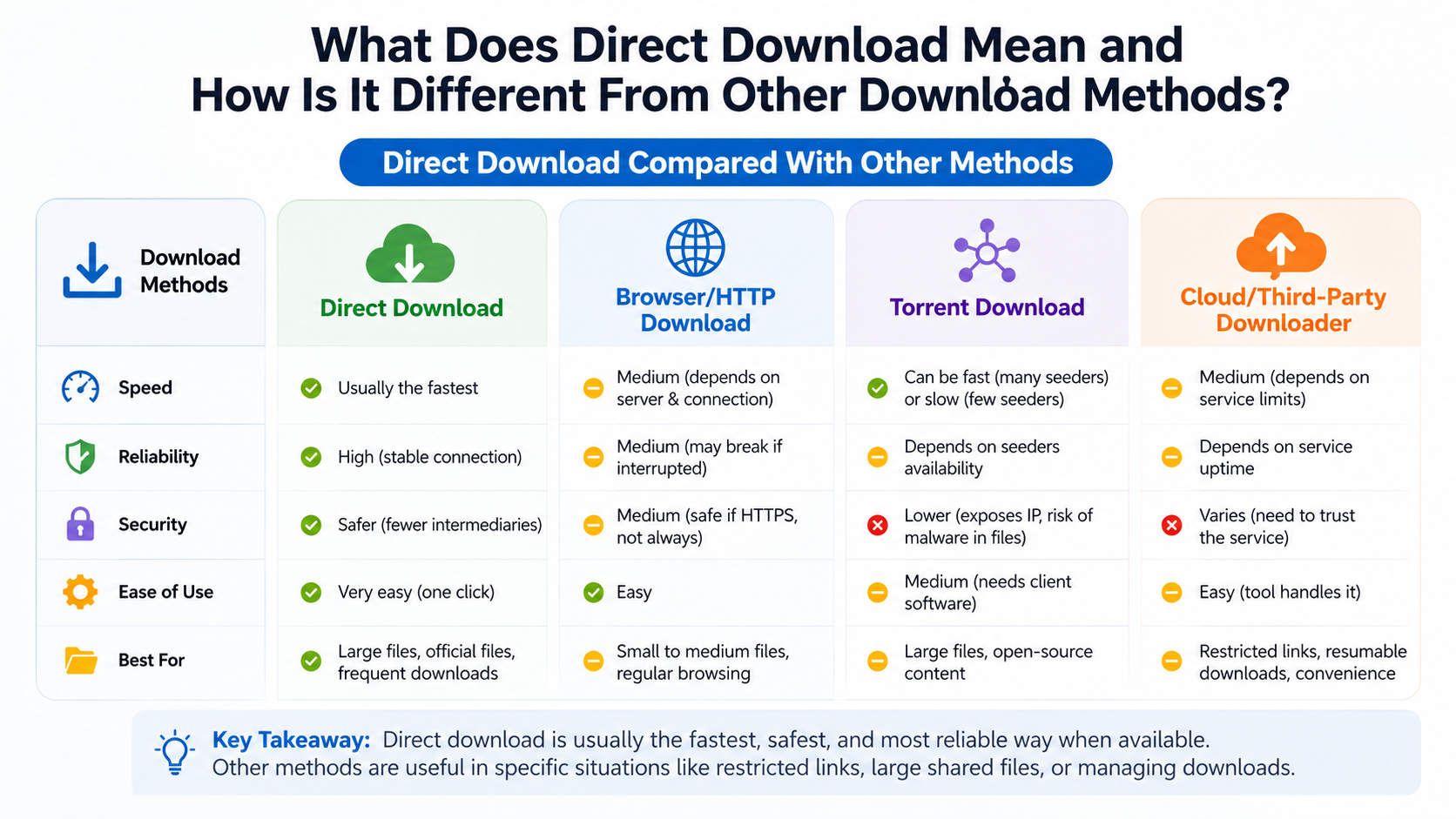
Direct Download Compared With Other Methods
| Method | Where the data comes from | Extra software usually needed? | Main difference |
|---|

| Direct download | One website or server | No | Browser retrieves the file from a server |
| App-store download | Google Play, Apple App Store or another store | Store app | Includes account, licensing, update and platform checks |
| Torrent/P2P | Several users’ devices (“peers”) | Yes, usually a torrent client | File arrives in pieces from a swarm of users |
| Cloud-storage download | A cloud provider’s server | No | May begin from a preview/share page or a direct file endpoint |
| Download manager | A server, using a dedicated application | Yes | Adds queueing, pause/resume and connection management |
| Streaming | Streaming service servers | App or browser | Plays data progressively instead of normally saving the complete file |
| Sideloading | Developer or third-party website | Sometimes | Installs an app outside the platform’s main store |
Direct download vs torrent
A torrent uses peer-to-peer (P2P) technology. A torrent client downloads small pieces from multiple computers and may upload pieces to other users while downloading. A direct download uses a conventional client-server connection: your device requests the file from a server controlled by the website or hosting provider.
Direct download advantages:
- Simple browser-based process
- No torrent client or seeding
- Usually easier for documents and installers
- Clearer source when using an official publisher
Possible disadvantages:
- The server may limit speed or simultaneous downloads
- A link may expire
- A failed connection can interrupt a large transfer
- The host may remove the file
A torrent is not automatically illegal, and a direct download is not automatically legal. Copyright depends on the content and the rights granted by its owner.
Direct download vs app-store download
Google Play and Apple’s App Store also deliver apps from servers, but they are managed distribution systems. They can handle identity, payments, compatibility checks, updates, reviews and licensing.
For Android users in India, Google Play is generally the first choice for apps that are available there. Google Play Protect checks apps when installed and periodically scans devices, including apps obtained from other sources.Google Play Protect
On iPhone and iPad, Apple recommends the App Store for apps that meet its review and security requirements.Apple Support A direct website download is not the normal iPhone installation method in India; Apple’s alternative web distribution is limited to eligible regions and arrangements.
Direct download vs cloud-storage link
A Google Drive, OneDrive, Dropbox or similar link may open a webpage showing a preview, permissions screen or download button. That is still a server-based download, but it may not be a “direct link” in the strict sense.
A direct cloud link typically:
- Starts the file transfer immediately
- Points to the file or a download endpoint
- May require permission or sign-in
- Can stop working if the owner changes access settings
Do not assume that a familiar cloud brand proves the file is trustworthy. The owner of the shared file still matters.
Direct download vs download manager
A download manager is software that controls downloads. It may split a file into connections, queue several files, schedule transfers or resume an interrupted download. It does not change the underlying source: the file may still be a direct server download.
For a large game or installer on an unreliable Indian mobile connection, a reputable manager can be useful. However, installing an unknown “download accelerator” can create additional security and privacy risks.
Direct download vs streaming
Streaming sends data progressively so that audio or video can play while more data arrives. A direct download normally saves a complete file for later use. Some services offer an offline feature, but that may create an encrypted in-app copy rather than a normal video or audio file that you can move elsewhere.
How to Make a Direct Download Safely
Use the shortest reliable process:
- Find the publisher’s official website. Type the address yourself or use a verified store listing rather than a random advertisement.
- Confirm the product name, operating system and file type.
- Select Download, Get installer or the equivalent official button.
- Check the browser’s download panel and the final filename.
- Wait for the transfer to finish before opening the file.
- Scan the file with your device’s security tools.
- Install only if the source, filename and requested permissions make sense.
- Keep the installer until you know the application works, or delete it from the Downloads folder afterward.
On Windows, Microsoft Defender SmartScreen evaluates the reputation of downloaded files and can warn when Edge considers a download suspicious.Microsoft Support
On Android, leave Google Play Protect enabled. If you must install an APK from a developer’s official website, verify the developer, package name, permissions and any published checksum. Avoid modified, “premium unlocked” or pirated APKs.
What to check before opening a downloaded file
- Correct domain: Watch for misspellings and look-alike domains.
- HTTPS: Encryption protects the connection but does not prove the website is honest.
- File extension: Be cautious if a document unexpectedly ends in
.exe,.scror a double extension such asinvoice.pdf.exe. - Checksums or signatures: Use them when the publisher provides official values or signing instructions.
- Permissions: An unrelated app asking for SMS, accessibility or banking access deserves special caution.
- Copyright: Download only content you are authorised to use.
Platform-Specific Notes
Android phones and tablets
The usual method is Google Play. Direct APK downloads can be legitimate for open-source projects, enterprise apps or developers distributing software from their own sites. Android may require permission to install from that particular source, such as a browser or file manager. Enable it only when necessary and disable it again afterward if you do not need it.
iPhone and iPad
Use the App Store unless Apple’s officially supported alternative distribution is available in your region. A normal website link cannot simply install an arbitrary iOS app like an APK on Android.
Windows PCs
Download .exe or .msi installers from the software publisher or Microsoft Store. Confirm whether you need 32-bit, 64-bit or ARM software. A direct installer may still require internet access during setup and may not include later updates.
macOS
Official software may arrive as a .dmg, .pkg or App Store installation. macOS can block unidentified developers; do not bypass security warnings unless you have independently confirmed the publisher and file.
Linux
Use the distribution’s package manager or the project’s official repository when possible. A direct .deb, .rpm, AppImage or archive may require manual updates and dependency management.
Common Direct-Download Problems
The link opens a preview instead of downloading. Look for the site’s Download command, or right-click and choose Save link as where appropriate. Some services intentionally require a sign-in or permission.
The download is very slow. The server may be throttling traffic. Try a stable Wi-Fi connection, avoid peak congestion, or use a reputable resume-capable manager. Changing DNS or using a VPN cannot guarantee higher speed.
The download stops midway. Check free storage, battery-saving restrictions and network stability. Restart from the browser’s Downloads panel; some servers support resume while others require starting again.
The file will not open. Confirm that the download completed, the file type matches your operating system and the correct application is installed. Re-download from the official source if the file appears damaged.
Android blocks the APK. This may be a security warning, an incompatible package or a restricted device policy. Do not disable protections simply to force installation; obtain the app from Google Play or the developer’s verified instructions.
Frequently Asked Questions
Is a direct download faster than a torrent?
Not necessarily. Speed depends on the server, your internet plan, congestion, file size and limits imposed by the host. A well-seeded torrent can be faster than a restricted server, while an official server can be faster than a poorly seeded torrent.
Is direct download safe?
The method itself is not a safety guarantee. A direct download from an official publisher may be appropriate, while a direct link from an unknown site may contain malware, scams or unauthorised content. Check the source and scan files before opening them.
Does direct download mean downloading without the internet?
No. A direct download requires an internet connection to transfer the file. After it is saved, you may be able to install or use it offline if the software does not require online activation or services.
Can I pause and resume a direct download?
Often, yes. Browsers and download managers can resume when the server supports partial requests and the original link remains valid. Temporary or protected links may not resume.
Is downloading from Google Drive a direct download?
It can be. If Google Drive sends the actual file to your device, it is a direct server download. If the link only opens a preview page, you still need to select Download.
Does direct download avoid viruses?
No. Malware can be hosted on ordinary websites and delivered through direct links. Keep Windows Security or Play Protect active and avoid unexpected executable files.
What is a direct download link?
It is a hyperlink or URL that requests a file from a server, often starting the transfer without requiring several intermediate pages. The link may be temporary, access-controlled or generated only after you sign in.
Should I use a direct download or an app store?
For mobile apps, use Google Play or the App Store whenever the app is available. For desktop software, use the publisher’s official direct installer or the operating system’s trusted store, depending on the developer’s instructions.




