
How Much Data Does It Take to Download YouTube Videos for Offline Viewing?
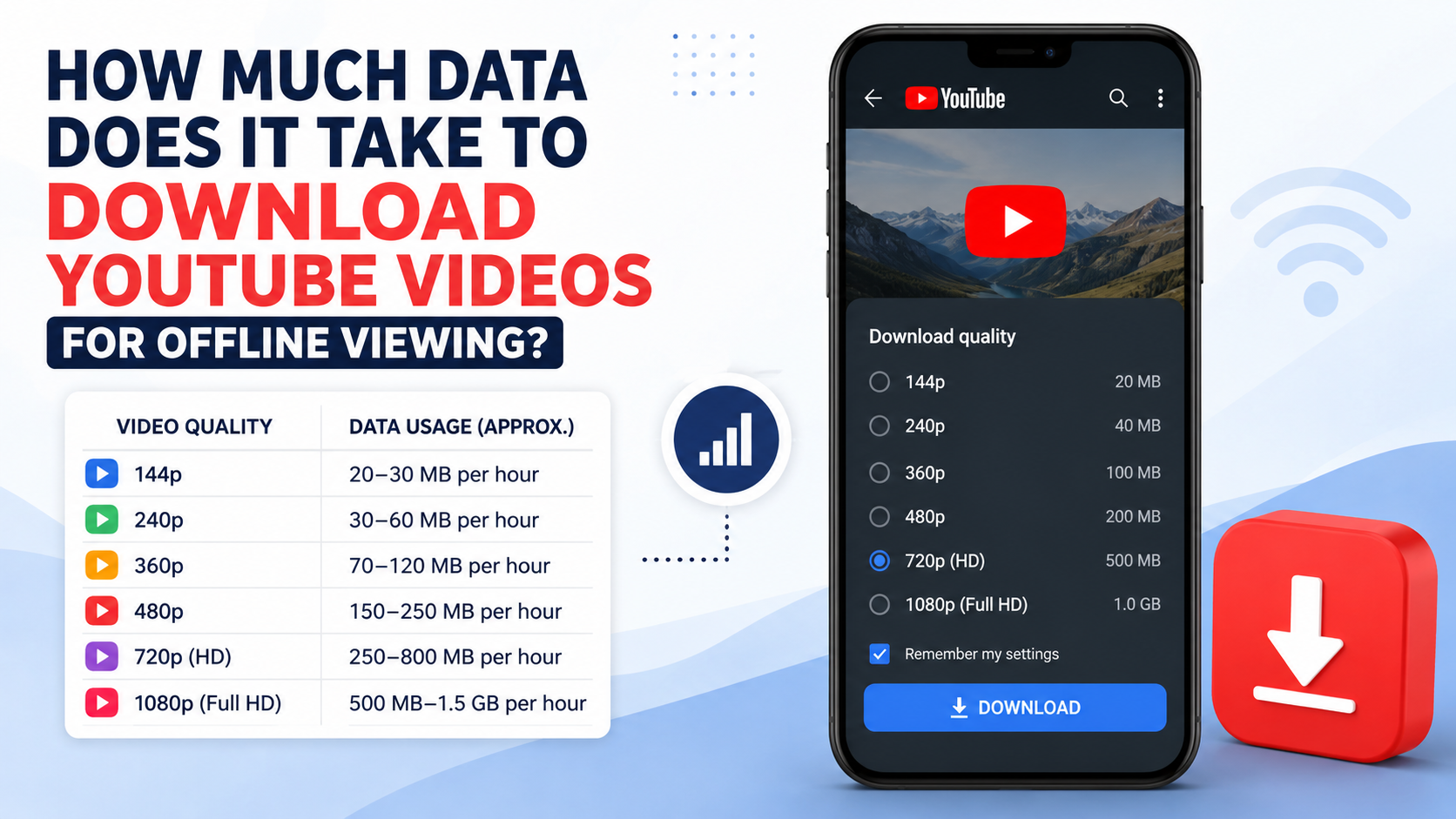
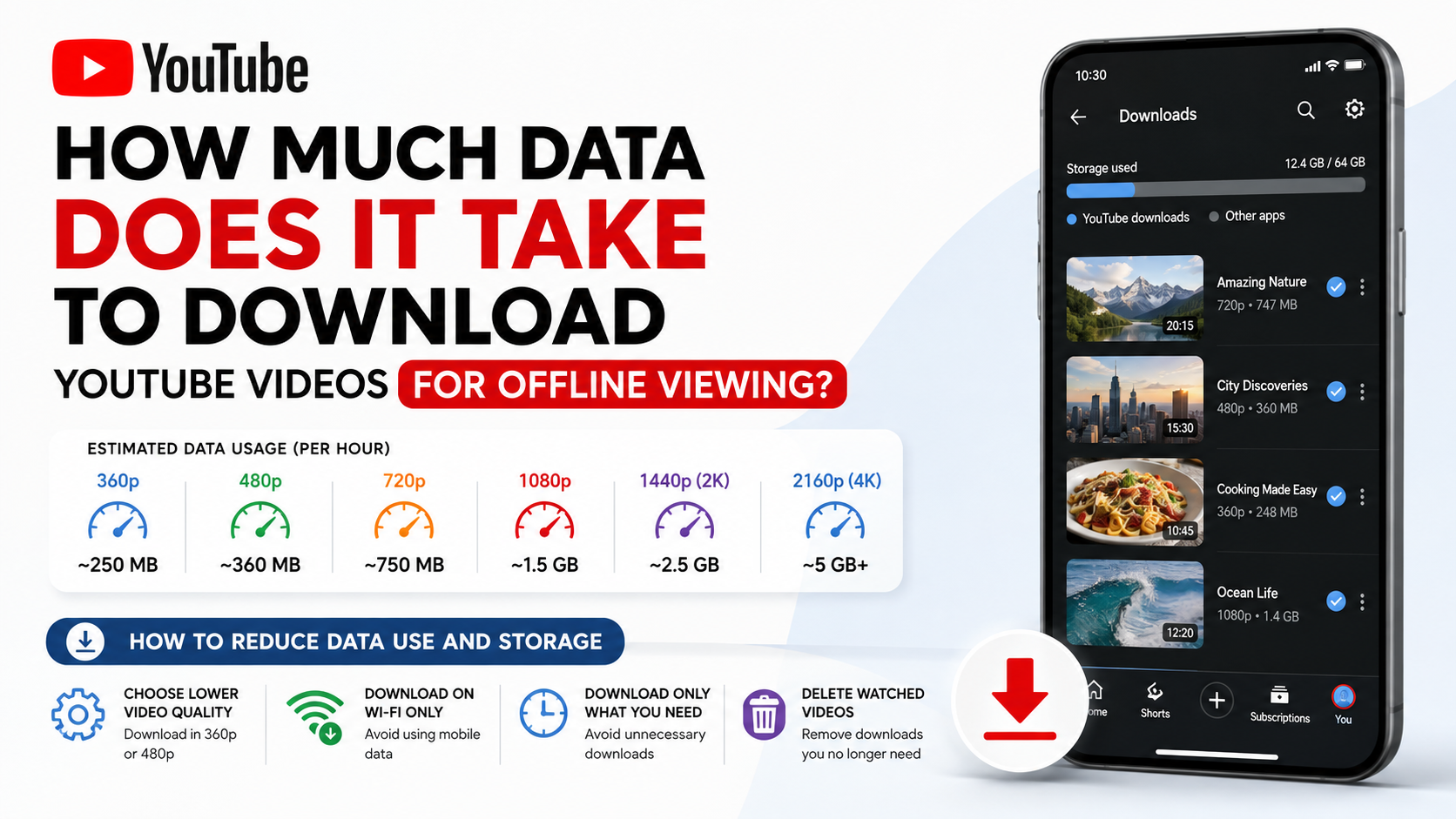
If you are asking “how much is it to download YouTube videos”, you may mean either mobile data usage or the cost of downloading them legally. The data required depends mainly on video length, resolution, frame rate and YouTube’s encoding. A one-hour video can use roughly 250 MB at 360p, 600 MB–1 GB at 480p, 1.5–2.5 GB at 720p, and 2.5–4.5 GB at 1080p.
These are practical planning estimates, not fixed file sizes. YouTube processes every video differently, and the app normally shows the approximate download size after you select a quality.
Key Takeaways
- Video length and download quality have the biggest effect on data consumption.
- A 10-minute video may use about 40–750 MB, depending on resolution.
- YouTube’s official offline downloads are stored inside the YouTube app, not as normal MP4 files in your gallery.
- In India, offline downloads may be available through YouTube Premium and, where rolled out, Premium Lite; availability varies by plan and video.
- Enable Download over Wi-Fi only to avoid using your mobile data unexpectedly.
- Third-party downloader websites and modified APKs can create malware, privacy and copyright risks.
Estimated Data Use by YouTube Video Quality
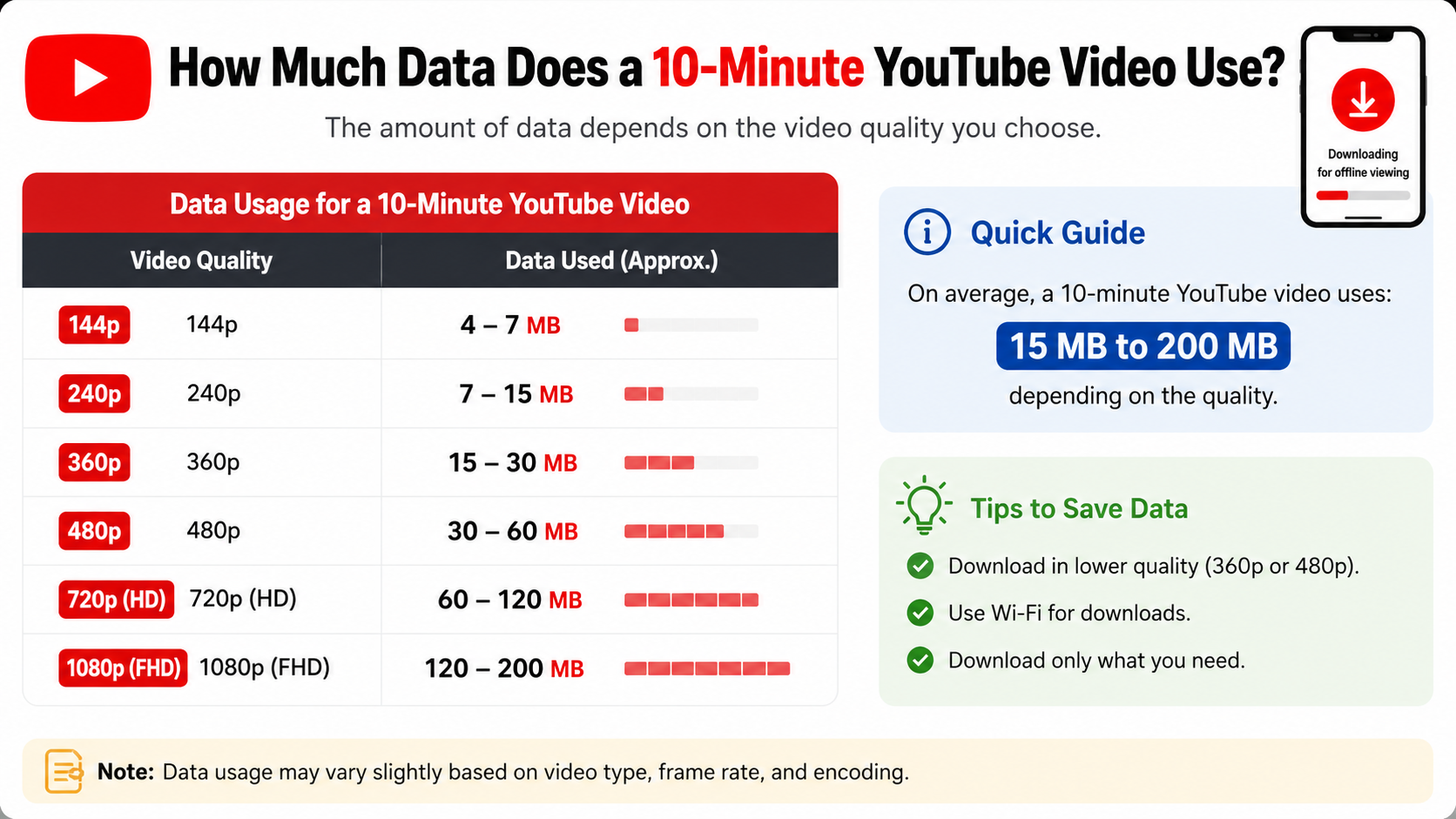
The following table gives reasonable estimates for a normally encoded video with stereo audio. Actual figures can be higher or lower.
| Video quality | Approximate data per 10 minutes | Approximate data per 30 minutes | Approximate data per hour |
|---|---|---|---|
| 144p | 10–25 MB | 30–75 MB | 60–150 MB |
| 240p | 20–40 MB | 60–120 MB | 120–240 MB |
| 360p | 40–90 MB | 120–270 MB | 250–550 MB |
| 480p (SD) | 100–180 MB | 300–550 MB | 600 MB–1.1 GB |
| 720p (HD) | 250–450 MB | 750 MB–1.35 GB | 1.5–2.7 GB |
| 1080p (Full HD) | 450–750 MB | 1.35–2.25 GB | 2.7–4.5 GB |
| 1440p (2K) | 700 MB–1.2 GB | 2.1–3.6 GB | 4.2–7.2 GB |
| 2160p (4K) | 1.5–3 GB | 4.5–9 GB | 9–18 GB |
YouTube does not publish one universal download size for each resolution. The estimates above are based on common video bitrates and should be used for budgeting your data pack and phone storage.
A useful formula is:
Data in megabytes ≈ bitrate in megabits per second × seconds ÷ 8
Audio, subtitles, container information and encoding overhead add to the result. Fast-moving sports, gaming footage and detailed scenes usually require more data than a static lecture at the same resolution.
Why the Same-Length Videos Have Different Sizes
Two 30-minute videos can have very different download sizes because of several technical factors:
Resolution and bitrate
Resolution describes the number of pixels, such as 480p, 720p or 1080p. Bitrate describes how much data is used each second to represent the picture and sound. Higher resolution normally requires a higher bitrate, although efficient codecs can reduce the difference.
YouTube’s published upload guidance lists recommended SDR video bitrates of about 1 Mbps for 360p, 2.5 Mbps for 480p, 5 Mbps for 720p and 8 Mbps for 1080p at standard frame rates. These are upload recommendations, not guaranteed offline-download rates, but they illustrate why HD videos consume more data. YouTube’s encoding guidance provides the official reference values.
Frame rate
A 60-frame-per-second video contains twice as many frames as a 30-fps video. Sports, music performances and gaming videos are often available at 50 or 60 fps, so their downloads may be larger.
Codec and video content
YouTube may offer different streams using codecs such as AVC or VP9, depending on the device and video. Complex scenes with smoke, crowds or rapid camera movement generally compress less efficiently than a presenter speaking against a plain background.
Audio quality
Music and podcast videos with higher-quality stereo audio add more data than a basic spoken recording. Audio is usually a smaller part of the total than video, but it still affects the final size.
How Much Data Does a 10-Minute YouTube Video Use?
For a quick answer, a 10-minute video usually consumes approximately:
- 360p: 40–90 MB
- 480p: 100–180 MB
- 720p: 250–450 MB
- 1080p: 450–750 MB
- 4K: 1.5–3 GB
A 20-minute educational video would use approximately twice those amounts. A two-hour film or lecture would also use about twice the one-hour estimate, assuming the same quality and frame rate.
The most accurate method is to tap Download, choose a quality and read the size shown by the YouTube app before confirming.
Does Downloading Use Mobile Data or Wi-Fi?
It can use either. YouTube’s Android help page says downloads may occur over Wi-Fi and mobile data by default, and provides a setting to restrict downloads to Wi-Fi. YouTube’s offline-download instructions explain where to change this option.
To prevent accidental mobile-data usage on Android:
- Open the YouTube app.
- Tap your profile picture.
- Select Settings.
- Open Background & downloads.
- Turn on Download over Wi-Fi only.
- Open Download quality and select a lower or standard quality if storage is limited.
Menu names can vary slightly by app version and device language. On iPhone and iPad, look for the equivalent download and cellular-data options in YouTube settings and in iOS mobile-data settings.
If you use a phone hotspot connected to a laptop or smart TV, the download counts against the hotspot device’s mobile plan. A Wi-Fi icon does not necessarily mean the connection is unlimited.
How to Download YouTube Videos Safely for Offline Viewing
The safest legitimate method is YouTube’s built-in download feature.
Android, iPhone and iPad
- Sign in to the YouTube app.
- Open the video you want to watch offline.
- Tap Download below the video, or tap the three-dot menu and choose Download.
- Select the available video quality.
- Wait for the download to finish.
- Open your profile picture and select Downloads to watch it offline.
Offline availability depends on the video, location, device and account. YouTube says Premium members can download videos on supported mobile devices and computers where the feature is available. Downloads are encrypted and intended for playback inside YouTube; they do not appear as ordinary video files in your phone’s gallery. YouTube’s offline FAQ describes these limitations.
Windows and macOS
YouTube Premium users can download supported videos from YouTube on compatible desktop browsers, including Chrome, Edge, Firefox and Opera, according to YouTube’s help documentation. The downloaded content remains associated with YouTube and is played through the service rather than exported as a freely shareable file.
Premium and Premium Lite in India
YouTube Premium includes offline video downloads as part of its membership benefits. Google has also announced the rollout of background play and downloads for Premium Lite subscribers in India, with availability dependent on the rollout, plan and eligible content. Google’s India announcement says Premium remains the option for access to all videos, music content and YouTube Music Premium benefits.
Check the membership page shown in your own YouTube account for the current Indian price and eligibility. Prices, plans and promotional offers can change, and purchasing through an app store may display different billing terms.
How to Reduce Data Use and Storage
If your daily mobile plan is 1.5 GB or 2 GB, downloading several HD videos can consume the allowance quickly. These measures help:
- Use 360p or 480p for lectures, news and spoken content viewed on a phone.
- Choose 720p when text, diagrams or demonstrations need more clarity.
- Reserve 1080p and 4K for large screens or detailed footage.
- Download on home broadband or trusted public Wi-Fi.
- Check the video size before tapping the final download option.
- Delete completed videos from Profile → Downloads.
- Review automatic or Smart Downloads so recommended videos do not fill your storage.
- Leave free storage space on Android or iOS; a nearly full device can interrupt downloads.
- Avoid downloading an entire playlist unless you actually need every video.
For Indian users, a stable fibre connection or an unlimited broadband plan is usually better for large 1080p or 4K downloads than a limited prepaid data pack.
Common Problems With YouTube Offline Downloads
The Download button is missing
The video may not support offline playback in your region, your account may not have the required membership, or the app may need updating. Some content is restricted by licensing or the uploader’s settings.
The download stops or fails
Check your connection, available storage and battery-saving restrictions. YouTube recommends a strong connection for downloads. Retry on reliable Wi-Fi and keep the app updated.
The video disappears from Downloads
Offline downloads are not permanent files. YouTube periodically requires the device to reconnect to the internet so it can verify availability. If the video is removed, restricted or your membership changes, offline playback may stop.
The video is not in the phone gallery
That is expected for YouTube’s official offline feature. The content is stored for playback within the YouTube app, not for editing, sharing or opening in another player.
Are YouTube Downloader Websites Safe?
Unofficial downloader sites and modified YouTube APKs may expose you to deceptive advertisements, malware, unwanted notifications, account theft and modified files. They can also violate YouTube’s terms or copyright law when used to copy content without permission.
Use the built-in YouTube download feature, download your own uploaded videos through YouTube Studio, or obtain media directly from a creator who provides an authorised download. Never enter your Google password into a third-party downloader.
Frequently Asked Questions
How much is it to download YouTube videos?
If you mean data, a one-hour download may use about 250–550 MB at 360p, 600 MB–1.1 GB at 480p, 1.5–2.7 GB at 720p and 2.7–4.5 GB at 1080p. If you mean price, offline downloads are a YouTube membership feature where available; check the current Premium or Premium Lite offer in India.
Does downloading a YouTube video use more data than watching it?
Usually, the total data is similar to watching the entire video once at the same quality. Downloading over mobile data uses the data immediately, while streaming may use less if you stop early or more if the quality changes upward.
Can I download YouTube videos for free in India?
Some videos may offer limited offline playback in selected regions. Premium and eligible Premium Lite plans provide broader official access. Availability is controlled by YouTube and can differ by video and account.
What quality should I choose for a 1 GB data pack?
Choose 360p for several hours of spoken content, or 480p for roughly one hour depending on the encoding. Avoid 720p or 1080p if the same 1 GB allowance is needed for messaging, browsing and other apps.
Where are downloaded YouTube videos stored?
They are stored in YouTube’s protected app storage and accessed from Downloads inside YouTube. They are not normal MP4 files that can be moved to the gallery.
Does offline viewing use data?
Playing a fully downloaded video normally does not stream the video again. However, the app may need occasional internet access to verify the download, refresh recommendations or load advertisements and other online features.
Why is my downloaded video larger than expected?
The selected quality, high frame rate, audio track, codec and the video’s complexity all affect size. Check the size displayed by YouTube before confirming future downloads.


