How Long Does Minecraft Take to Download on Different Wi-Fi Speeds?
The answer depends on two things: the download size shown by your store or launcher and your actual internet speed. As a quick guide, a 1 GB Minecraft download takes about 13 minutes at 10 Mbps, 5 minutes 20 seconds at 25 Mbps, and 1 minute 20 seconds at 100 Mbps under ideal conditions. A 2 GB download takes roughly twice as long.
Actual times can be longer because Wi-Fi signal strength, network congestion, server load, background updates and download overhead reduce the speed shown in a speed test.
Key Takeaways
- Download time is calculated from file size and speed: time = file size in megabits ÷ download speed in Mbps.
- At 10 Mbps, allow approximately 13–27 minutes for a 1–2 GB download.
- At 50 Mbps, the same download may take about 3–6 minutes.
- Minecraft’s package size varies by platform, edition, updates and optional content. Check the size displayed in Google Play, the Microsoft Store, PlayStation Store, Xbox Store or Nintendo eShop.
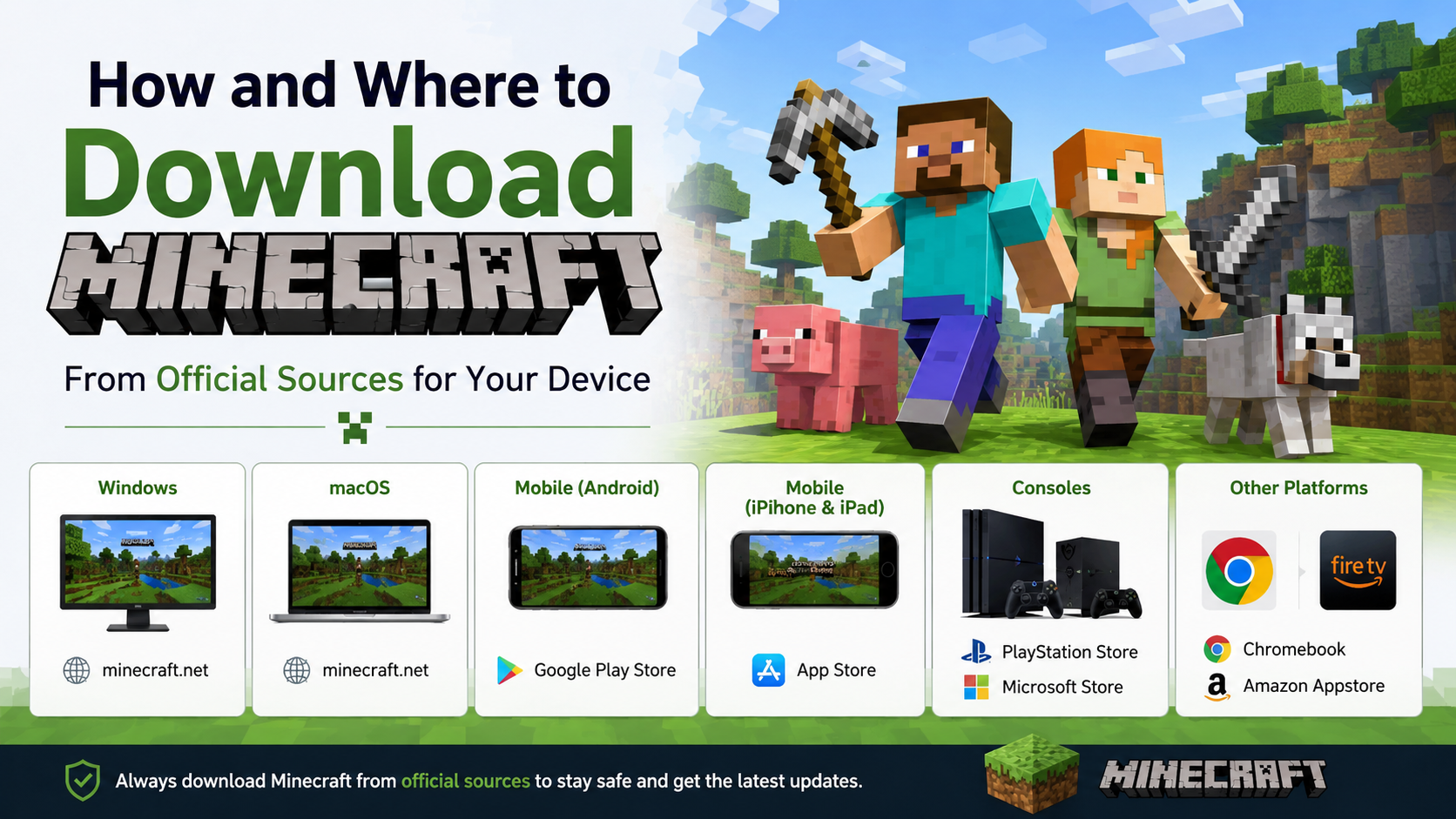
- Minecraft Java Edition runs on Windows, macOS and Linux, while Bedrock Edition is available on PC, consoles, mobile and Chromebook. Minecraft’s official comparison explains the platform differences.
- Download only from official stores or Minecraft.net. Unofficial APKs and “free” PC installers can contain modified files, malware or copyright-infringing copies.
Minecraft Download Time Calculator

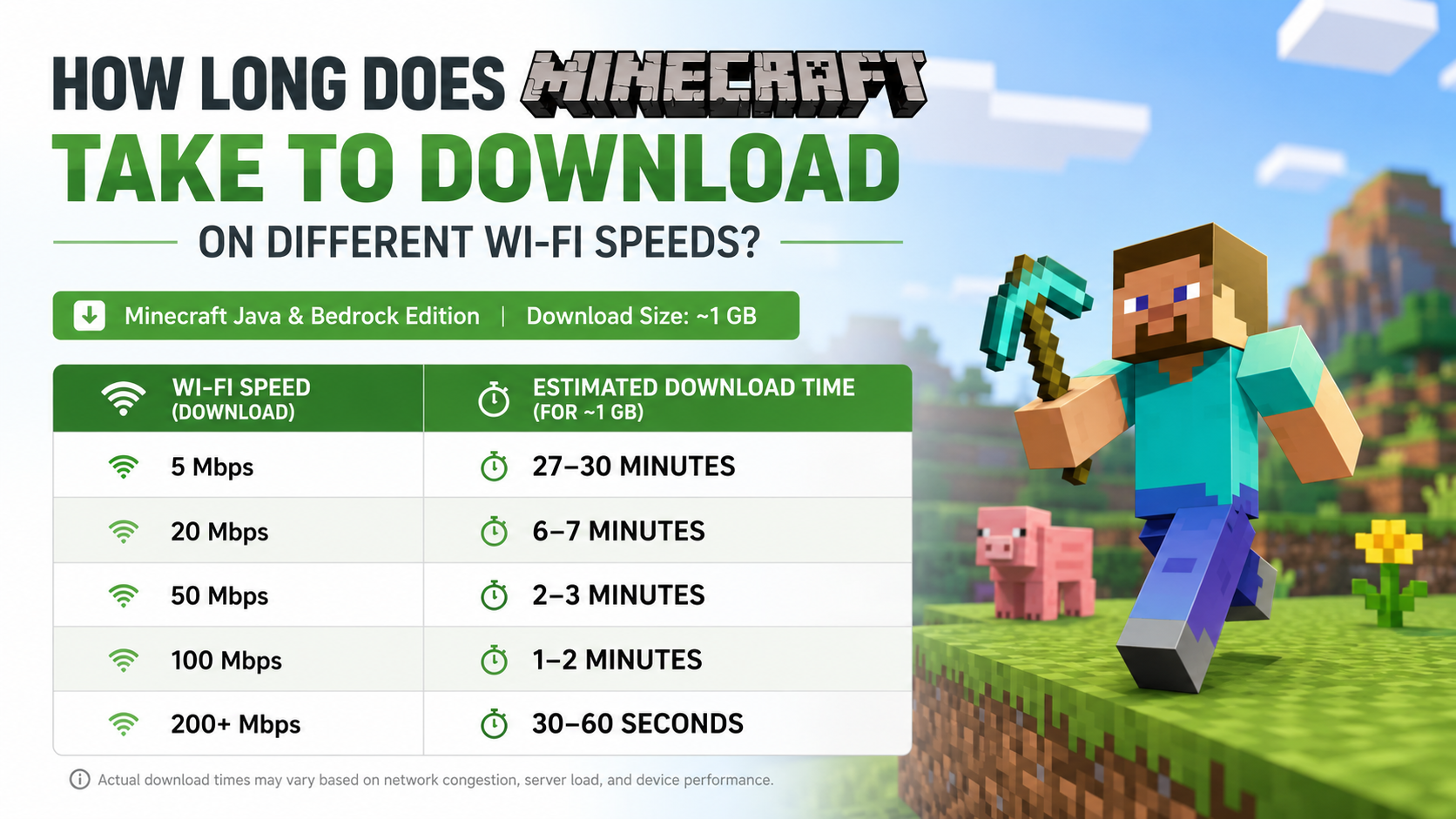
The table below uses two example download sizes. They are practical estimates, not a claim about one fixed Minecraft file size. The store may deliver a different package depending on your platform, edition and update status.
| Wi-Fi speed | 1 GB download, ideal | 2 GB download, ideal | More realistic allowance |
|---|---|---|---|
| 5 Mbps | 26 min 40 sec | 53 min 20 sec | 32–70 minutes |
| 10 Mbps | 13 min 20 sec | 26 min 40 sec | 16–35 minutes |
| 25 Mbps | 5 min 20 sec | 10 min 40 sec | 6–14 minutes |
| 50 Mbps | 2 min 40 sec | 5 min 20 sec | 3–7 minutes |
| 100 Mbps | 1 min 20 sec | 2 min 40 sec | 2–4 minutes |
| 200 Mbps | 40 seconds | 1 min 20 sec | 1–2 minutes |
The realistic allowance includes protocol overhead and normal speed fluctuations. If several people are streaming video or downloading files on the same connection, the Minecraft download can take considerably longer.
Why the estimate may differ
Internet providers advertise speeds in megabits per second (Mbps). File sizes are usually shown in megabytes (MB) or gigabytes (GB). There are eight megabits in one megabyte, so a 100 Mbps connection does not download 100 MB every second. In ideal conditions, it delivers about 12.5 MB per second.
For a rough calculation:
- Convert gigabytes to megabits.
- 1 GB ≈ 8,000 megabits
- 2 GB ≈ 16,000 megabits
- Divide by your speed in Mbps.
- Add around 20–30% for overhead and variation.
For example, at 25 Mbps:
- 1 GB: 8,000 ÷ 25 = 320 seconds, or about 5 minutes 20 seconds.
- 2 GB: 16,000 ÷ 25 = 640 seconds, or about 10 minutes 40 seconds.
How Large Is the Minecraft Download?

There is no single permanent download size for every device. Minecraft is distributed through different stores and launchers, and the download can include the base game, platform-specific components and updates.
The final size can change because of:
- Java or Bedrock Edition
- Android, iPhone, Windows, macOS, Linux or console platform
- Game updates and hotfixes
- Language files
- Bundled launcher components
- Optional add-ons, texture packs and Marketplace content
- Existing installation data being replaced or patched
The official Minecraft PC store currently lists storage requirements separately: 4 GB minimum and 8 GB recommended for Bedrock, and 2 GB minimum and 4 GB recommended for Java. These are storage requirements for installing and playing, not guaranteed download sizes. Check the launcher or store listing immediately before downloading. Official PC requirements and edition details.
On Android, use the official Minecraft listing on Google Play. Google Play displays the package information for your device and region. The listing identifies Mojang as the developer and links to Minecraft support. Avoid websites offering “Minecraft APK” files outside Google Play.
Download Times by Platform
Android phones and tablets
Android downloads normally come through Google Play. The store may first download the application and then retrieve additional game data after installation. Therefore, the progress bar can continue after the initial app package appears to finish.
To download safely:
- Open Google Play Store.
- Search for Minecraft.
- Confirm that the developer is Mojang.
- Review the displayed price, compatibility and storage information.
- Tap Buy or Install, then authenticate your Google account.
- Keep the phone connected to Wi-Fi while the download and installation complete.
On a 10 Mbps connection, a package around 500 MB would take approximately 7 minutes in ideal conditions. A package around 1 GB would take about 13 minutes. Your actual listing may be larger or smaller.
Windows PC
Windows players may install Minecraft through the official Minecraft Launcher, Microsoft Store or an owned game library. The PC package can involve both the launcher and the selected Java or Bedrock installation.
The basic process is:
- Visit Minecraft.net’s official download page.
- Download the Minecraft Launcher for Windows.
- Install and open the launcher.
- Sign in with the Microsoft account used to purchase Minecraft.
- Select Java Edition or Minecraft for Windows (Bedrock).
- Choose Install and select the available storage location.
Minecraft’s official store states that Java Edition supports Windows, macOS and Linux, while Bedrock supports Windows, consoles, mobile and Chromebook. Java and Bedrock also have different system requirements, so a fast download does not guarantee that the game will run smoothly.
The current official Java requirements page lists a 64-bit operating system, at least 8 GB of RAM with a discrete GPU or 12 GB with integrated graphics for the minimum target, and a Vulkan 1.3-capable GPU with at least 2 GB of VRAM. See the current Java requirements.
iPhone and iPad
On iOS and iPadOS, download Minecraft from the Apple App Store using the official Mojang listing. The store shows the current app size and whether your device is compatible. iOS may also download updates or additional content after the initial installation.
PlayStation, Xbox and Nintendo Switch
Console downloads are managed through the platform’s own digital store. Search for the official Minecraft product page, check the publisher and edition, and begin the download from your game library after purchase.
Consoles often download updates immediately after the base game. If an update is released while you are installing, the total time may be longer than the original store size suggests. Put the console in a well-ventilated area and avoid switching it off during installation.
Why Minecraft Downloads Slowly on Fast Wi-Fi
A “100 Mbps” broadband plan describes the connection’s maximum theoretical rate. Your Minecraft download may be slower for several reasons:
- Weak Wi-Fi signal: Thick walls and distance from the router reduce throughput.
- 2.4 GHz interference: Nearby networks and household devices can create congestion. A 5 GHz network is often faster at short range.
- Shared bandwidth: Streaming, cloud backups and other downloads compete with Minecraft.
- Busy game servers: The store or launcher may limit speeds during peak demand.
- Device limitations: Older phones, hard drives or nearly full storage can slow installation.
- VPN or proxy use: Extra routing can reduce speed or add instability.
- Background updates: Windows, Android or console updates may consume bandwidth.
- Wi-Fi power saving: Some phones reduce network activity when the screen is off.
For the best result, pause other downloads, move closer to the router, use Ethernet on a PC or console where possible, and restart the router if the connection is consistently unstable.
How to Check Your Real Download Speed
Use a reputable speed-test service or your internet provider’s application while no other device is heavily using the connection. Run two or three tests at different times because Indian broadband and mobile networks can vary during evening peak hours.
Compare the download Mbps result with the speed shown in the Minecraft launcher or store. It is normal for the game download to show a lower number. The launcher reports the rate for that specific server connection, while the speed test measures a different server and route.
If your test shows 50 Mbps but Minecraft downloads at 5 Mbps, check whether the launcher is displaying MB/s rather than Mbps. A rate of 5 MB/s is approximately 40 Mbps.
Troubleshooting a Minecraft Download That Is Stuck
Try these steps in order:
- Confirm that your device has more free storage than the listed installation requirement.
- Pause and resume the download.
- Restart the launcher, app store or console.
- Reconnect to Wi-Fi or test with Ethernet.
- Pause streaming and other downloads on the network.
- Restart the router and device.
- Check the official Minecraft Help service for outages or account problems.
- On Android, update Google Play Store and Google Play Services, then retry.
- On Windows, sign in again with the Microsoft account that owns the game.
- If an update repeatedly fails, cancel it only after confirming that your saved worlds are backed up.
Do not install a random APK or an unofficial launcher as a shortcut. It may be an altered build, may not receive legitimate updates and can expose your account or device to security risks.
Frequently Asked Questions
How long does Minecraft take to download at 10 Mbps?
A 1 GB download takes about 13 minutes 20 seconds in ideal conditions. Allow roughly 16–20 minutes in normal use. A 2 GB download may take 27–35 minutes.
Can Minecraft download in five minutes?
Yes, if the package is about 1 GB and your sustained speed is close to 25 Mbps or higher. A larger update, slower server or busy Wi-Fi network can extend the time.
Is 5 Mbps enough to download Minecraft?
It is enough, but expect approximately 27 minutes for 1 GB under ideal conditions and longer in practice. Avoid using the connection for streaming or other downloads simultaneously.
Does Minecraft need Wi-Fi after it is installed?
Many single-player features can work offline after installation and account verification. Multiplayer, updates, Marketplace content and Realms require an internet connection.
Why is Minecraft taking longer to install than to download?
Downloading transfers the files. Installation must unpack, verify and write them to storage. Slow or nearly full storage, antivirus scanning and updates can make this second stage take several minutes.
Which is faster for Minecraft: mobile data or Wi-Fi?
It depends on your measured speed and stability. Mobile data may be faster than weak home Wi-Fi, but it can use a large amount of data and may incur charges or fair-use limits. Wi-Fi is usually preferable for a multi-gigabyte game.
Where should I download Minecraft in India?
Use Google Play for Android, the Apple App Store for iPhone and iPad, the Microsoft Store or Minecraft Launcher for Windows, and the official store on your console. Start from Minecraft.net whenever you are unsure which listing is genuine.
Will a faster Wi-Fi plan make Minecraft run with better graphics?
No. Download speed affects installation time. Graphics and frame rate depend mainly on the device’s processor, graphics hardware, memory, drivers and in-game settings.