How Long Should a 50GB Game Take to Download at Different Internet Speeds?
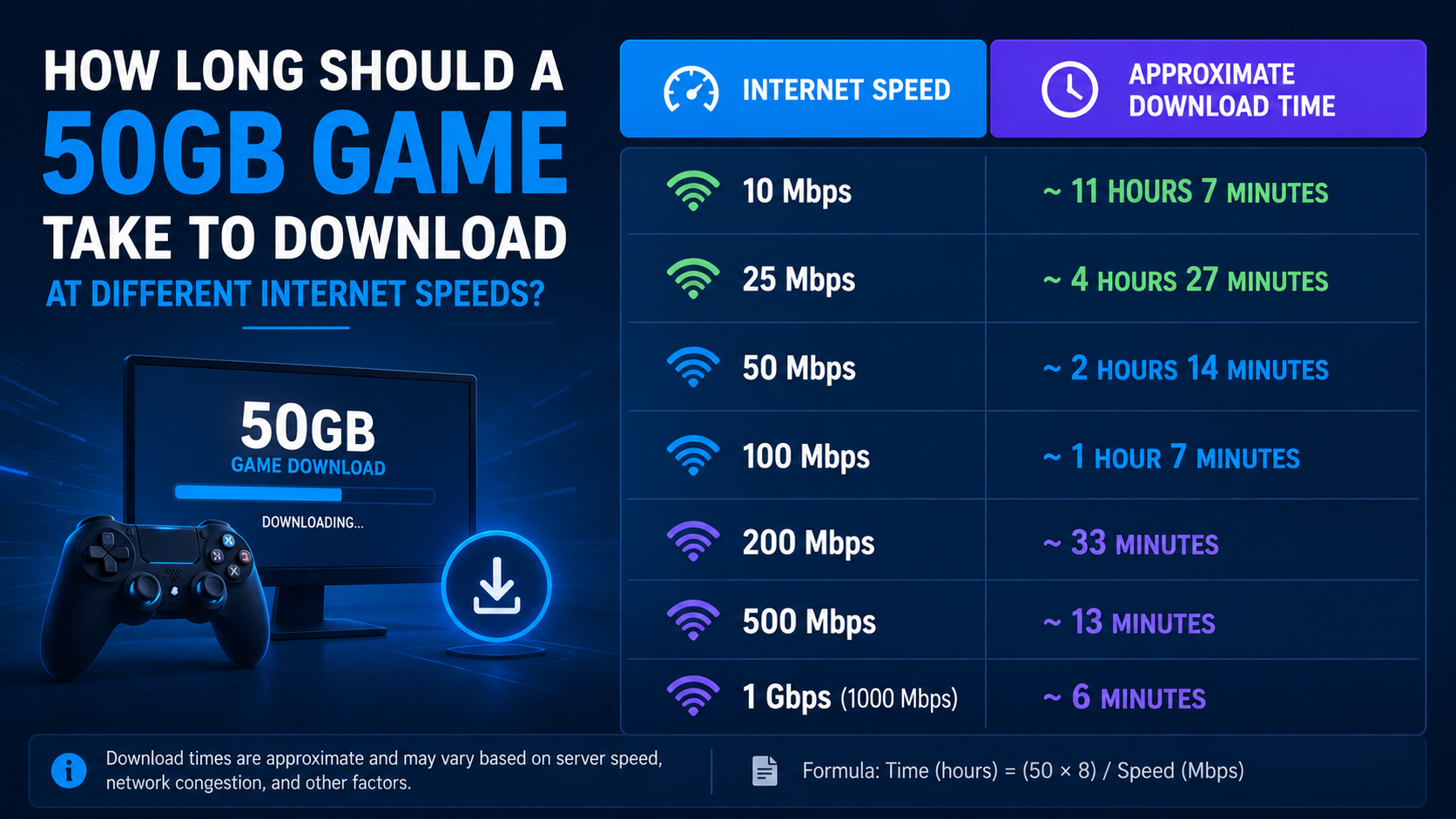
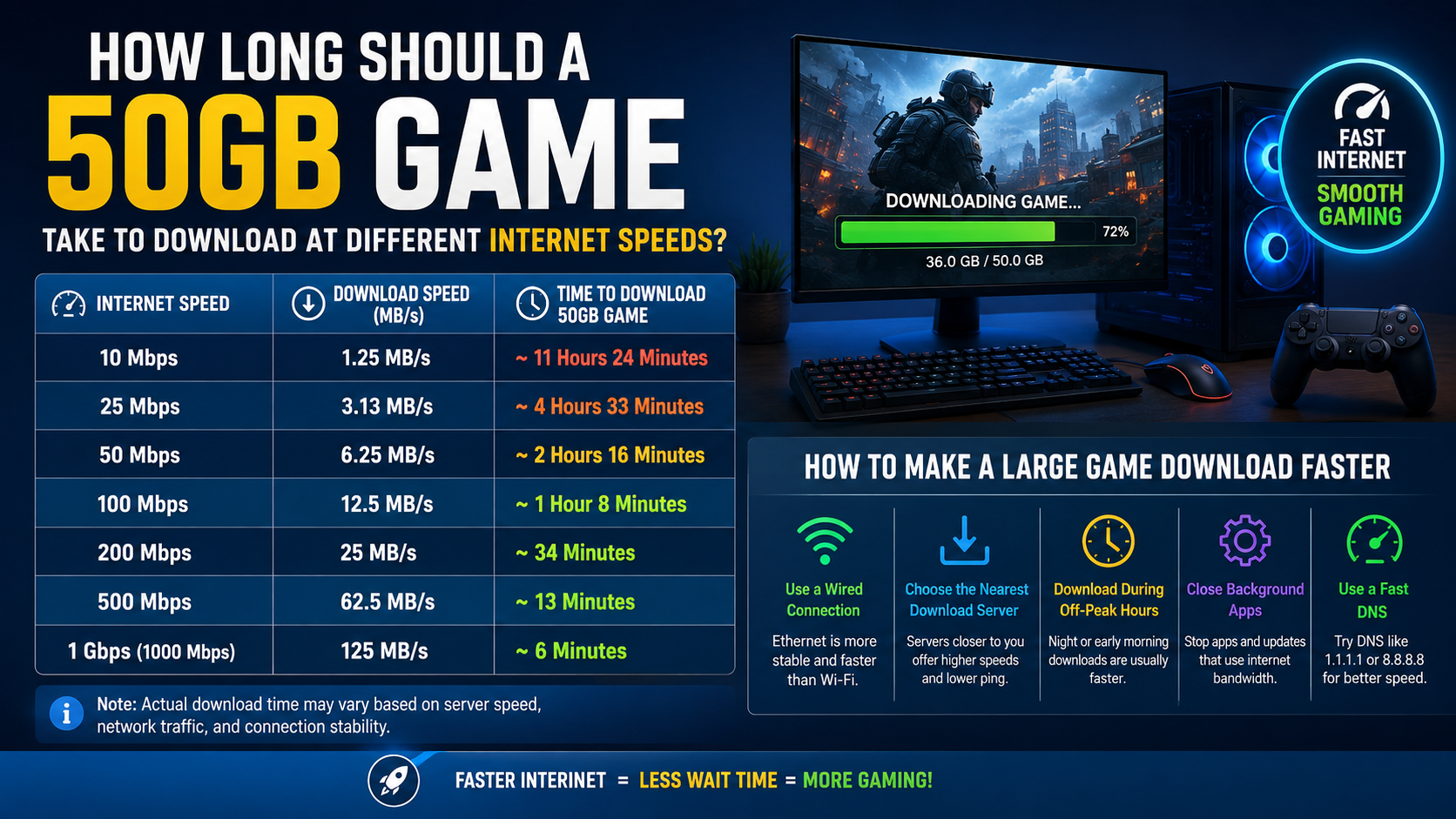
A 50GB game can take anywhere from about 7 minutes to more than 11 hours, depending on your actual download speed. At a steady 100 Mbps, the theoretical time is approximately 1 hour 7 minutes. In real conditions, plan for roughly 1 hour 15 minutes to 1 hour 30 minutes because of Wi-Fi interference, server limits, network congestion and installation work.
This guide explains the calculation, compares common internet speeds in India and shows what to do when a game downloads more slowly than expected.
Key Takeaways
- A 50GB download contains approximately 400,000 megabits (Mb) using decimal units.
- The basic formula is: Download time in seconds = 400,000 ÷ speed in Mbps.
- At 100 Mbps, a 50GB game takes about 67 minutes theoretically.
- Actual download times are commonly 10–25% longer than the mathematical estimate.
- Internet providers advertise speeds in Mbps, while some launchers display MB/s. Divide Mbps by 8 to convert.
- Use a wired connection or 5GHz Wi-Fi, pause other downloads and choose an official game launcher or store.
50GB Game Download Time at Different Internet Speeds
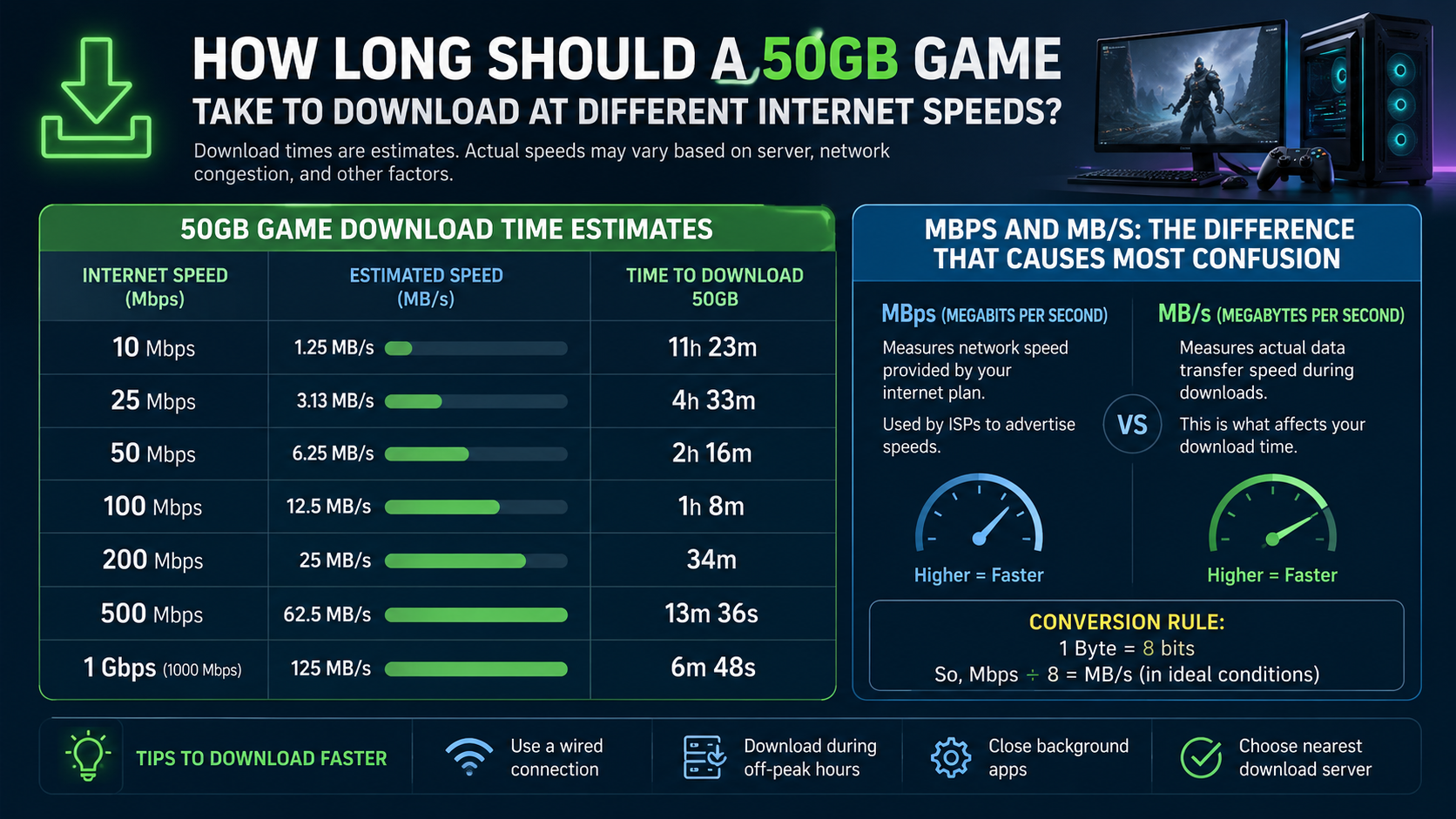
The following estimates assume a 50GB decimal file and a connection that maintains its advertised speed continuously.
| Internet speed | Approximate download rate | Theoretical time for 50GB | Practical planning time |
|---|---|---|---|
| 10 Mbps | 1.25 MB/s | 11 hours 7 minutes | 12–14 hours |
| 20 Mbps | 2.5 MB/s | 5 hours 33 minutes | 6–7 hours |
| 30 Mbps | 3.75 MB/s | 3 hours 42 minutes | 4–5 hours |
| 50 Mbps | 6.25 MB/s | 2 hours 13 minutes | 2.5–3 hours |
| 75 Mbps | 9.38 MB/s | 1 hour 29 minutes | 1.5–2 hours |
| 100 Mbps | 12.5 MB/s | 1 hour 7 minutes | 1 hour 15–30 minutes |
| 200 Mbps | 25 MB/s | 33 minutes | 35–45 minutes |
| 300 Mbps | 37.5 MB/s | 22 minutes | 25–30 minutes |
| 500 Mbps | 62.5 MB/s | 13 minutes | 15–20 minutes |
| 1 Gbps (1,000 Mbps) | 125 MB/s | 6 minutes 40 seconds | 8–12 minutes |
The practical range is an estimate, not a guarantee. A busy game server, a congested ISP route or a slow hard drive can add substantially more time.
How to Calculate the Download Time Yourself
Use this simple calculation:
- Convert the file size to megabits.
- Divide by your internet speed in Mbps.
- Convert seconds into minutes or hours.
For a 50GB game:
- 50GB × 1,000 megabytes = 50,000MB
- 50,000MB × 8 bits per byte = 400,000 megabits
- Download time = 400,000 ÷ your Mbps speed
Example: 100 Mbps connection
400,000 ÷ 100 = 4,000 seconds
4,000 ÷ 60 = 66.7 minutes
So the theoretical time is about 1 hour 7 minutes.
Example: 50 Mbps connection
400,000 ÷ 50 = 8,000 seconds
8,000 ÷ 3,600 = 2.22 hours
That equals approximately 2 hours 13 minutes before accounting for overhead.
Mbps and MB/s: The Difference That Causes Most Confusion
Internet plans normally use Mbps, meaning megabits per second. Game launchers may show MB/s, meaning megabytes per second.
There are eight bits in one byte, so:
MB/s = Mbps ÷ 8
Mbps = MB/s × 8
For example:
- 100 Mbps internet = approximately 12.5 MB/s
- 50 Mbps internet = approximately 6.25 MB/s
- 10 Mbps internet = approximately 1.25 MB/s
Steam explains this distinction in its support documentation: a displayed speed of 768KB/s corresponds to 6,144 kilobits per second, or approximately 6 Mbps from an internet provider. Steam Support
If a speed test reports 100 Mbps but Steam shows around 12 MB/s, that is normal. The two figures use different units.
Capitalisation matters:
- Mb or Mbps = megabits
- MB or MB/s = megabytes
Why the Real Download Takes Longer
The table uses ideal arithmetic. Actual transfers are slower for several reasons.
Wi-Fi signal and router location
A weak signal, thick walls, interference from neighbouring networks or an older router can reduce throughput. A 5GHz Wi-Fi network is often faster at short range, while 2.4GHz generally travels farther but may be more congested.
For the most consistent result, connect the gaming PC or console to the router using an Ethernet cable.
Network congestion
Your ISP may deliver lower speeds during busy evening periods. Other people in the home may also be streaming, attending video meetings or downloading updates.
TRAI’s official MySpeed service can measure performance on Indian broadband and mobile networks. TRAI MySpeed
Game-server limitations
Your connection may be capable of 100 Mbps, but the game platform may not send data at that rate. Content delivery servers can be busy, geographically distant or temporarily overloaded.
Launcher processing and disk speed
Modern games are often downloaded in compressed packages. The launcher may pause network transfer while it decrypts, verifies or writes files. A nearly full or slow hard disk can make the speed graph fluctuate.
An SSD generally handles installation and file unpacking better than an older mechanical hard drive, but it does not increase the speed supplied by your ISP.
Protocol overhead
Some bandwidth is used for network headers, acknowledgements and error correction. This is why a real transfer rarely reaches the exact maximum shown in a speed test.
Is Your 50GB Game Downloading at the Expected Speed?
Compare the launcher’s speed with your measured connection after converting units.
| Speed-test result | Approximate launcher speed |
|---|---|
| 30 Mbps | 3.75 MB/s |
| 50 Mbps | 6.25 MB/s |
| 100 Mbps | 12.5 MB/s |
| 200 Mbps | 25 MB/s |
| 500 Mbps | 62.5 MB/s |
A sustained result around 80–95% of the converted speed can be reasonable, especially on wired broadband. Mobile data, crowded Wi-Fi and distant servers may produce lower figures.
Do not compare a short speed-test peak with the average speed of a multi-hour game download. The relevant number is the sustained rate over time.
How to Make a Large Game Download Faster
Try these steps in order:
- Run a speed test on the same device and network you use for gaming.
- Stop other downloads and streams, including cloud backups, Windows updates and phone updates.
- Use Ethernet if possible. Otherwise, move closer to the router and use 5GHz Wi-Fi.
- Pause and resume the download in the launcher. This can reconnect you to a less busy content server.
- Check the launcher’s download limit. Steam, Epic Games Launcher, Xbox and other clients may have bandwidth restrictions.
- Close VPNs and unnecessary background applications that consume bandwidth or add routing distance.
- Restart the router if every device is unusually slow.
- Leave enough storage space for both the download and installation. A 50GB download may require additional temporary space.
- Download during off-peak hours if your connection becomes slower in the evening.
- Check your mobile plan’s data allowance before using a phone hotspot.
A 50GB game consumes approximately 50GB of downloaded data, and usage may be slightly higher because of updates, retries or additional launcher files. On a capped mobile connection, confirm the remaining data balance first.
Why a Download Can Stop or Show “Installing”
A launcher does not always download continuously. It may alternate between:
- Receiving compressed data
- Decompressing files
- Checking file integrity
- Applying patches
- Writing files to storage
During these stages, network usage can fall to zero even though the process is working. Avoid forcibly shutting down the computer unless the launcher is clearly frozen for an extended period.
If the estimated time suddenly increases, check whether the progress bar is still advancing. Estimates are recalculated from the recent speed and can change sharply after a brief slowdown.
Decimal GB Versus GiB
Storage manufacturers usually define:
- 1GB = 1,000MB
- 1MB = 1,000,000 bytes
Operating systems and some tools may use binary units:
- 1GiB = 1,024MiB
- 1GiB = 1,073,741,824 bytes
A file described as 50GiB is about 53.7GB in decimal terms, so it takes roughly 7.4% longer than a 50GB decimal file at the same speed. This explains some differences between a store listing, a launcher and the free-space figure in Windows.
Official Download Sources and Safety
Download a game through its official publisher, console store or recognised platform such as Steam, Epic Games Store, Microsoft Store, PlayStation Store or Xbox. The exact platform depends on the game and device.
Avoid “free full game” mirrors, modified installers, cracked packages and unknown APK or torrent sites. These can contain malware, unwanted software, altered files or copyright-infringing copies. A download that is faster is not useful if it compromises your account or device.
Keep the launcher updated, enable account security features such as two-factor authentication where available and scan unexpected files with your operating system’s security tools. No download source should be described as completely risk-free without independent verification.
Frequently Asked Questions
How long should 50GB take to download at 100 Mbps?
The theoretical time is about 1 hour 7 minutes. In normal conditions, expect approximately 1 hour 15 minutes to 1 hour 30 minutes.
How long does a 50GB game take at 50 Mbps?
At a constant 50 Mbps, it takes about 2 hours 13 minutes mathematically. Wi-Fi and server overhead usually make the practical time around 2.5 to 3 hours.
Is 100 Mbps fast enough for downloading large games?
Yes. A 100 Mbps connection can theoretically download 50GB in just over an hour. The actual result depends on the launcher server, Wi-Fi quality, other users and storage performance.
Why does my 100 Mbps plan download at 10 MB/s?
100 Mbps converts to 12.5 MB/s. A result around 10 MB/s represents approximately 80% of the advertised rate, which can be normal after Wi-Fi losses and protocol overhead.
Does a faster SSD reduce download time?
An SSD can reduce unpacking, verification and installation delays. It cannot increase the internet bandwidth coming from your ISP, so it may improve the total process without changing the network speed.
Can I download a 50GB game using mobile data in India?
Technically yes, but check your plan’s data limit, hotspot policy and network stability first. A 50GB download can consume most or all of a monthly or daily allowance.
Why does the download pause at 99%?
The launcher may be verifying files, applying a patch or writing data to disk. Wait several minutes and check disk activity before cancelling. If it remains unchanged, restart the launcher and use its repair or verify option.
How can I get a more accurate estimate?
Measure sustained speed on the same device, convert Mbps to MB/s correctly and use the remaining file size shown by the launcher. Add at least 10–25% for normal network and processing overhead.