How Long Should Fortnite Take to Download With Your Current Internet Speed?
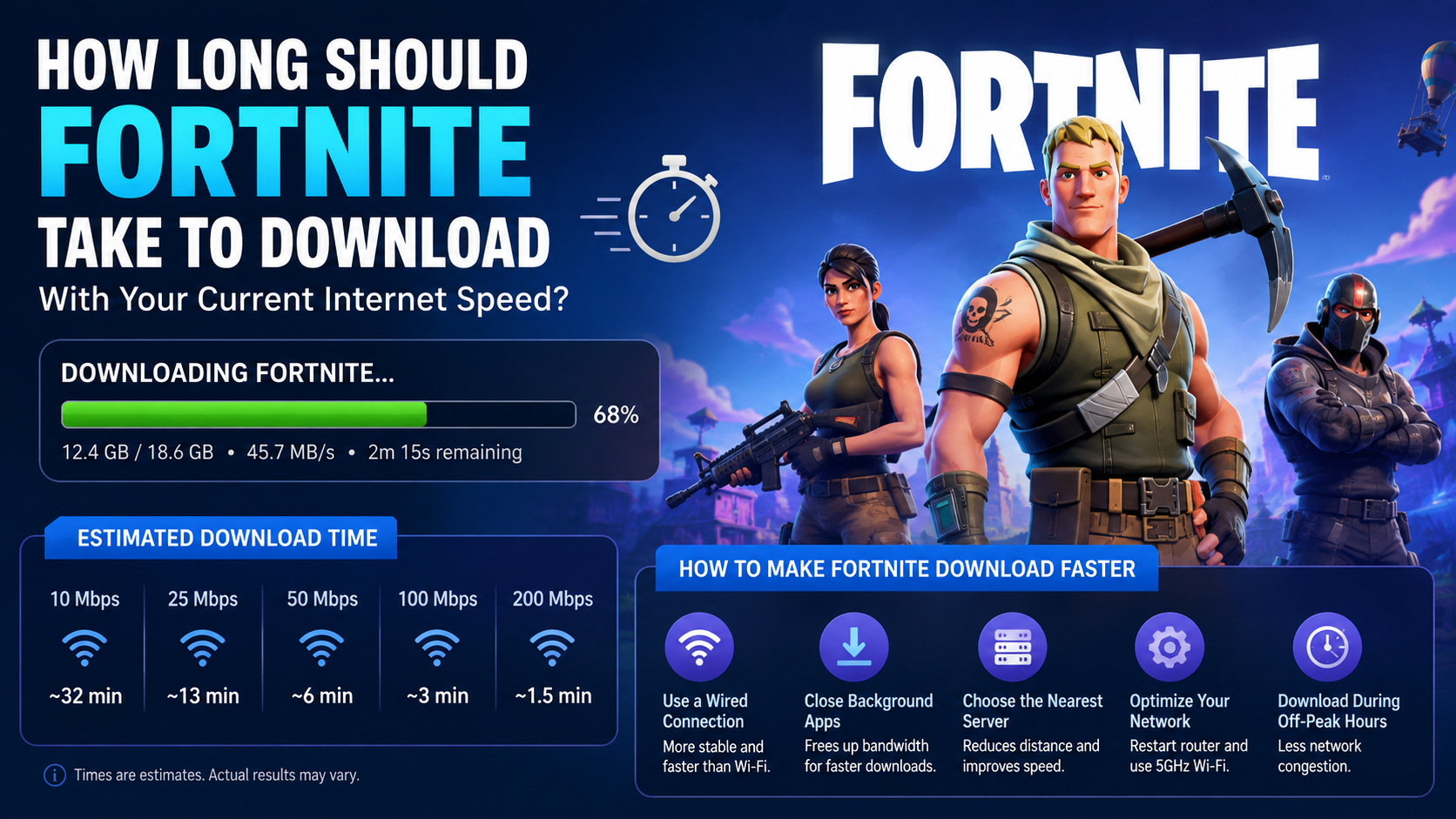
If you are asking how long should Fortnite take to download, the answer depends mainly on the download size shown by your launcher and your actual internet speed. A 60 GB installation may take about 5 hours 20 minutes at 25 Mbps, 1 hour 20 minutes at 100 Mbps, or 16 minutes at 500 Mbps under ideal conditions. Real downloads usually take 10–20% longer.
Fortnite’s required download can change by platform, season, installed game modes, language files, high-resolution textures and updates. Check the exact size displayed before starting.
Key Takeaways
- Download time is determined by Fortnite’s file size and your measured download speed.
- Internet providers advertise megabits per second (Mbps), while launchers often show megabytes per second (MB/s).
- Divide Mbps by 8 to estimate the maximum MB/s download rate.
- A 60 GB Fortnite download can take from around 8 minutes to more than 5 hours, depending on speed.
- Wi-Fi congestion, busy servers, background downloads and storage speed can make the process slower.
- Download Fortnite only through Epic Games, your console store or an official mobile store.
Fortnite Download Time at Common Internet Speeds
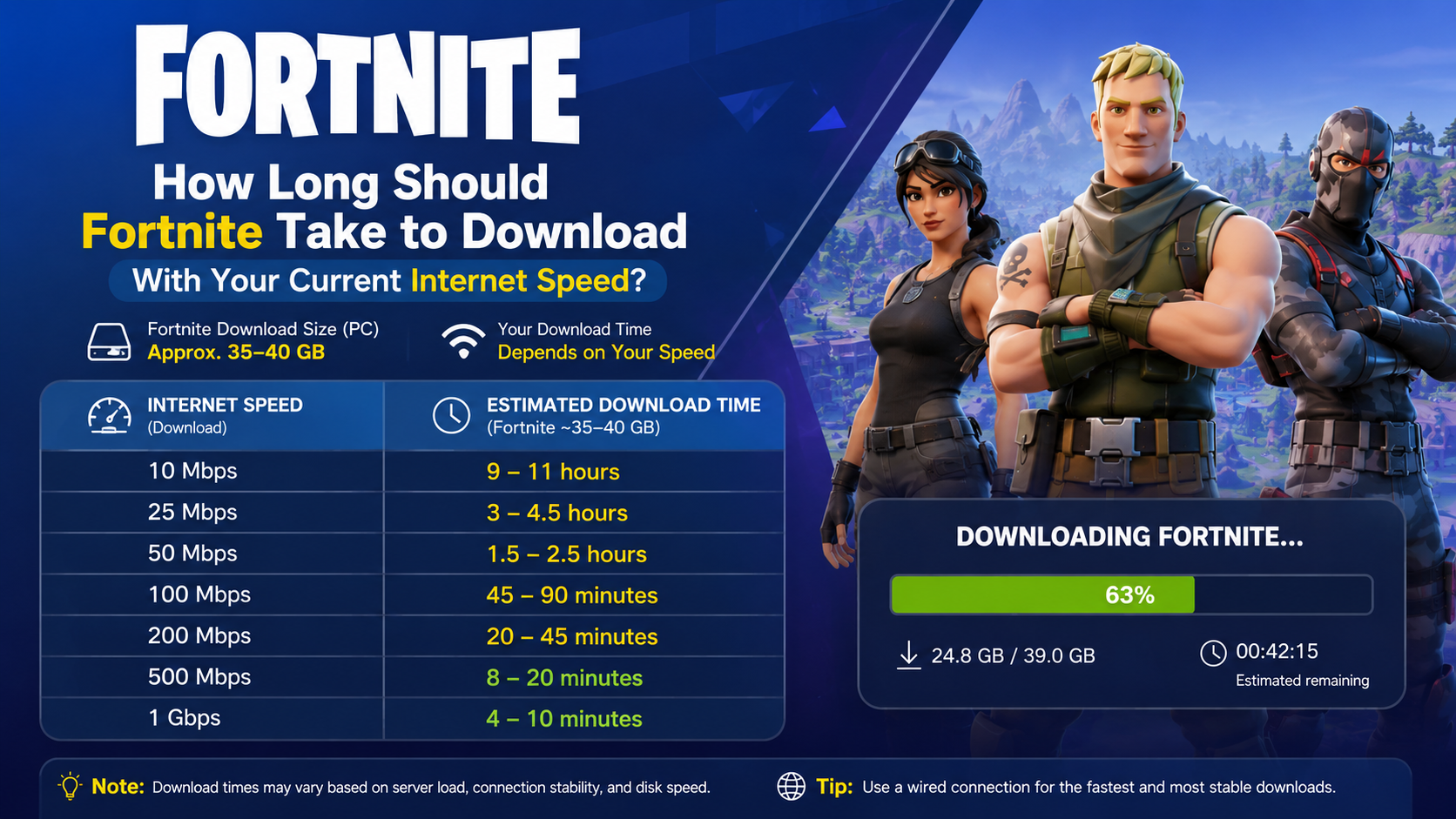
Fortnite does not have one permanent file size. The launcher may offer optional high-resolution textures, additional modes and other content. The following table uses a 60 GB download as a practical example.
| Internet speed | Theoretical time for 60 GB | More realistic estimate |
|---|---|---|
| 10 Mbps | 13 hours 20 minutes | 14–16 hours |
| 25 Mbps | 5 hours 20 minutes | 6–6.5 hours |
| 50 Mbps | 2 hours 40 minutes | 3–3.25 hours |
| 100 Mbps | 1 hour 20 minutes | 1 hour 30–40 minutes |
| 200 Mbps | 40 minutes | 44–48 minutes |
| 300 Mbps | 26 minutes 40 seconds | 29–32 minutes |
| 500 Mbps | 16 minutes | 18–20 minutes |
| 1 Gbps | 8 minutes | 9–10 minutes |
These are estimates, not guarantees. Your actual result depends on the sustained speed reaching your device, rather than the headline speed of your broadband plan.
For example, if a speed test shows 100 Mbps but the Epic Games Launcher averages 8 MB/s, Fortnite is downloading at approximately 64 Mbps. At that rate, a 60 GB file takes roughly 2 hours 5 minutes before overhead and interruptions.
How to Calculate Fortnite Download Time
Use this formula:
Download time in seconds = file size in gigabytes × 8,000 ÷ speed in MbpsThe formula treats 1 GB as approximately 1,000 MB. To convert the result:
- Divide seconds by 60 for minutes.
- Divide minutes by 60 for hours.
Example: 40 GB at 50 Mbps
40 × 8,000 ÷ 50 = 6,400 secondsThat equals about 1 hour 47 minutes in ideal conditions. A realistic result may be around 2 to 2 hours 10 minutes.
Example: 80 GB at 100 Mbps
80 × 8,000 ÷ 100 = 6,400 secondsAn 80 GB download at 100 Mbps therefore takes approximately 1 hour 47 minutes ideally, or about 2 hours in normal conditions.
Mbps and MB/s are different
This is the most common reason people think a game is downloading too slowly.
- Mbps means megabits per second and is used by Indian broadband and mobile providers.
- MB/s means megabytes per second and is commonly shown by launchers and download managers.
- One byte contains eight bits.
Therefore:
MB/s = Mbps ÷ 8A 100 Mbps connection has a theoretical maximum of 12.5 MB/s. Seeing 10–12 MB/s in the launcher is generally normal once network overhead is considered.
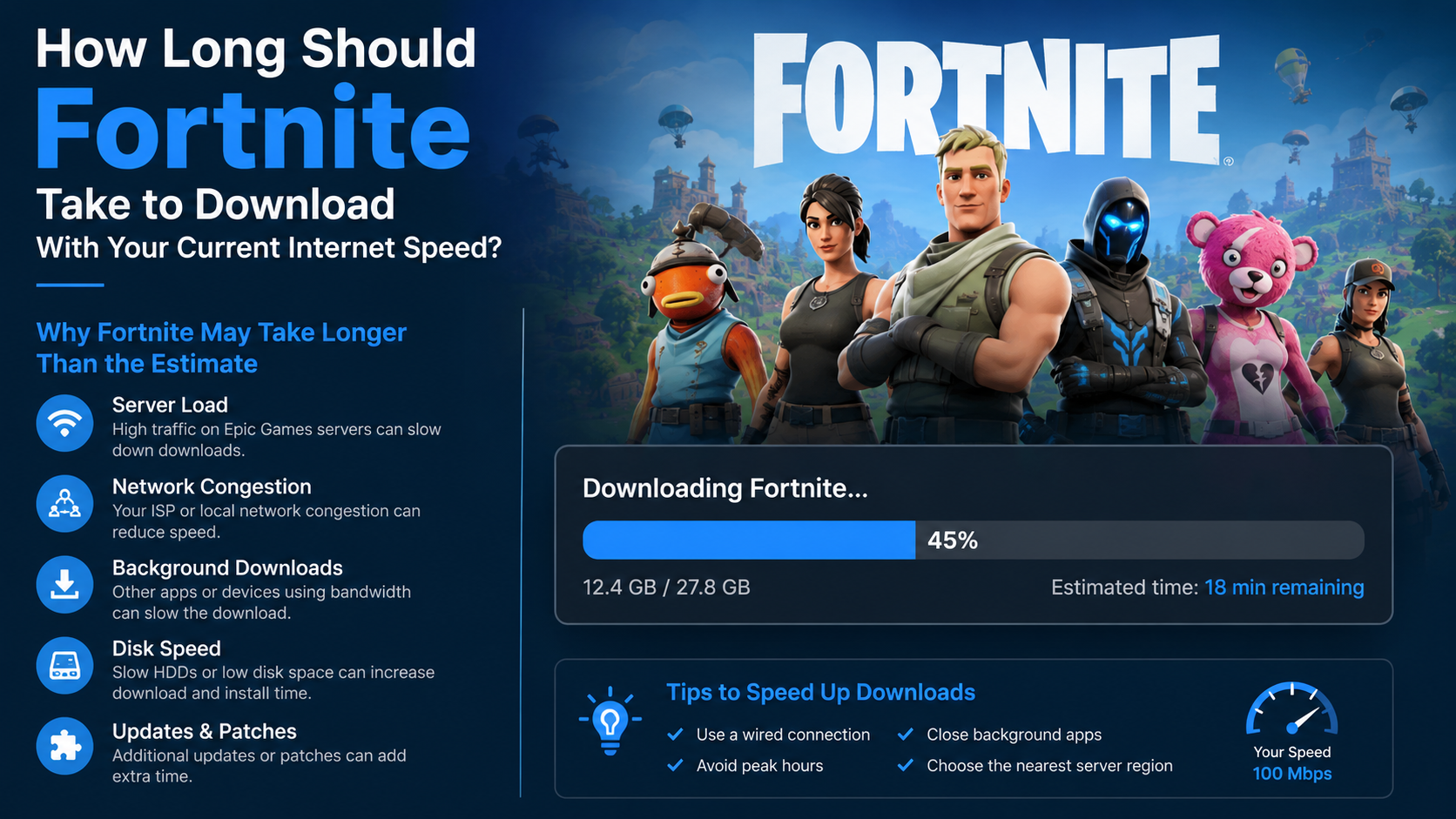
Why Fortnite May Take Longer Than the Estimate
Even with a fast JioFiber, Airtel Xstream Fiber, ACT, BSNL or mobile connection, the download can exceed the calculator’s estimate.
1. Your device is using Wi-Fi
The speed advertised on your plan is not always the speed available to a laptop, phone or console. Distance from the router, walls, interference and a crowded 2.4 GHz network can reduce throughput.
For a large game download:
- Use a wired Ethernet connection where possible.
- Move closer to the router if using Wi-Fi.
- Prefer a 5 GHz or 6 GHz network when your device supports it.
- Pause downloads and streaming on other devices.
2. Epic’s servers or your route are busy
Download speed depends on the complete route between your device and Epic’s content servers. Evening congestion, major seasonal launches and large patches can reduce the speed even when other websites work normally.
A speed test measures your connection to the test provider, not necessarily the route to Epic.
3. Other apps are consuming bandwidth
Pause YouTube, cloud backups, Windows updates, Steam downloads, torrent clients and phone backups. On a shared home connection, another person watching 4K video can significantly reduce the speed available to Fortnite.
4. The launcher is installing files
The progress bar may pause or slow while Fortnite verifies, decompresses or writes files to storage. This is not always a network problem. A hard disk drive (HDD), low free space or a heavily used drive can make installation and patching much slower than downloading alone.
Epic says Fortnite’s installation options can change the space required; high-resolution textures and other optional content may increase the installation footprint. Its support documentation also recommends changing installation options when Fortnite occupies too much storage. Epic Games installation-size support
5. Updates are not the same as a fresh install
A small update can still take a long time because the launcher may need to reorganise or verify large existing files. Epic notes that update sizes can differ between installations. Epic Games update-size explanation
Safest Ways to Download Fortnite
Download Fortnite from an official distribution channel for your device.
Windows PC
- Download the Epic Games Launcher from the official Epic Games Store.
- Install and open the launcher.
- Sign in to your Epic Games account or create one.
- Search for Fortnite.
- Select Get or Install.
- Review the installation options, including optional textures and content.
- Choose a drive with sufficient free space and start the download.
Epic’s current PC requirements list Windows 10 or 11 64-bit, at least 8 GB RAM and an Intel HD 4000 or AMD Vega 8-class minimum GPU. Recommended specifications include 16 GB RAM, an NVMe SSD and a GTX 960 or Radeon R9 280-class GPU. Epic Games PC system requirements
PlayStation and Xbox
Open the PlayStation Store or Microsoft Store on your console, search for Fortnite and select Download or Install. Keep the console connected to power and the internet. Consoles may continue downloading in Rest Mode or sleep mode when the relevant settings are enabled.
Nintendo Switch
Open Nintendo eShop, search for Fortnite and select the official listing. Make sure the console has adequate free storage and is connected to a stable network.
Android
Epic’s official mobile page directs Android users to download Fortnite through the Epic Games Store app or Google Play, depending on availability and device. Official Fortnite Android download page
Avoid random APK websites. Unofficial packages may be modified, outdated or bundled with malware. They can also create account-security and update problems.
iPhone and iPad
Mobile availability and installation methods can vary by country and regulatory changes. Use the current instructions on Fortnite’s official mobile page or the App Store listing available on your device. Do not trust websites offering “free Fortnite iOS APK” files; iOS does not use APK packages.
How to Make Fortnite Download Faster
Try these steps in order:
- Run a speed test on the same device that is downloading Fortnite.
- Stop other downloads, streaming services and cloud synchronisation.
- Connect the PC or console to the router with Ethernet.
- Restart the router if speeds are unusually low across all services.
- Download outside peak evening hours if your network is congested.
- Close unnecessary programs while the launcher is working.
- Install Fortnite on an SSD when available.
- Leave more free storage than the displayed download size for temporary files and updates.
- Check that the Epic Games Launcher is not limited by a download-throttling setting.
- Pause and resume once if the speed remains stuck at zero for an extended period.
Do not repeatedly cancel and restart a large download on mobile data. It may consume the same data again and could exceed your plan’s monthly limit.
When Is Fortnite Downloading Too Slowly?
A slower-than-expected result is not automatically a fault. Compare the launcher’s sustained MB/s with your measured speed.
Investigate further when:
- The launcher remains at 0 B/s for a long time.
- Other downloads are fast but Fortnite is consistently slow.
- Your speed test is far below your broadband plan.
- The download repeatedly disconnects or restarts.
- The launcher reports insufficient storage.
- Disk usage is at 100% while network usage is very low.
First test another large, reputable download. If every service is slow, contact your internet provider. If only Fortnite is affected, check Epic’s service status, restart the launcher and verify that security software or router controls are not blocking it.
Frequently Asked Questions
How long should Fortnite take to download at 100 Mbps?
For a 60 GB download, the ideal time is about 1 hour 20 minutes. Allow approximately 1 hour 30 minutes to 1 hour 40 minutes in normal conditions.
Is 50 Mbps fast enough to download Fortnite?
Yes. A 60 GB installation takes roughly 2 hours 40 minutes ideally and around 3 hours in practice. Larger installations or updates will take longer.
Why does Fortnite show MB/s instead of Mbps?
Launchers commonly display megabytes per second, while internet plans use megabits per second. Divide your Mbps speed by eight to compare the two figures.
Can I play Fortnite while it is downloading?
Usually, you must wait for the initial installation to finish. Some platforms allow other games or applications to run during a download, but using bandwidth simultaneously will increase the total time.
Does Fortnite use the same download size on every device?
No. PC and console installations can include different assets and optional content. Mobile versions are also packaged differently. Always rely on the size shown by the official store or launcher.
Why is a Fortnite update larger than expected?
Updates can include changed game files, optional assets or file reconstruction. Epic provides guidance for unusually large download sizes and recommends verifying installation files when necessary. Epic Games support for large update downloads
Will a faster internet plan always make Fortnite download faster?
No. A faster plan helps only when your current connection is the bottleneck. Server congestion, Wi-Fi quality, storage performance and launcher limits can still control the final speed.
How much mobile data will Fortnite use?
The download consumes approximately the amount of data shown by the store or launcher, plus a small amount of overhead. Check the displayed size before using a prepaid or capped Indian mobile connection.