How to Download Minecraft on Android, iPhone, Windows, and Mac Step by Step
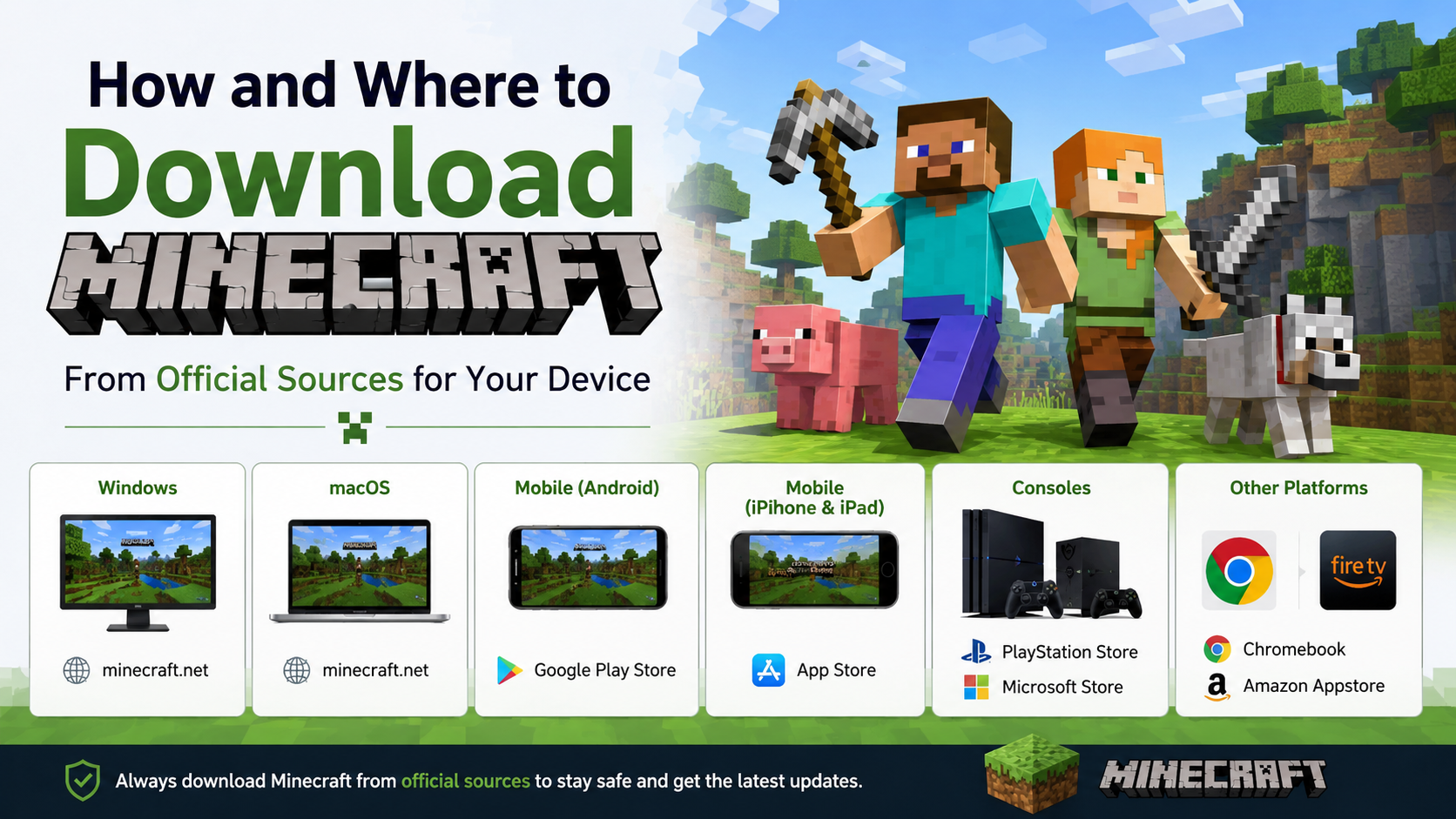
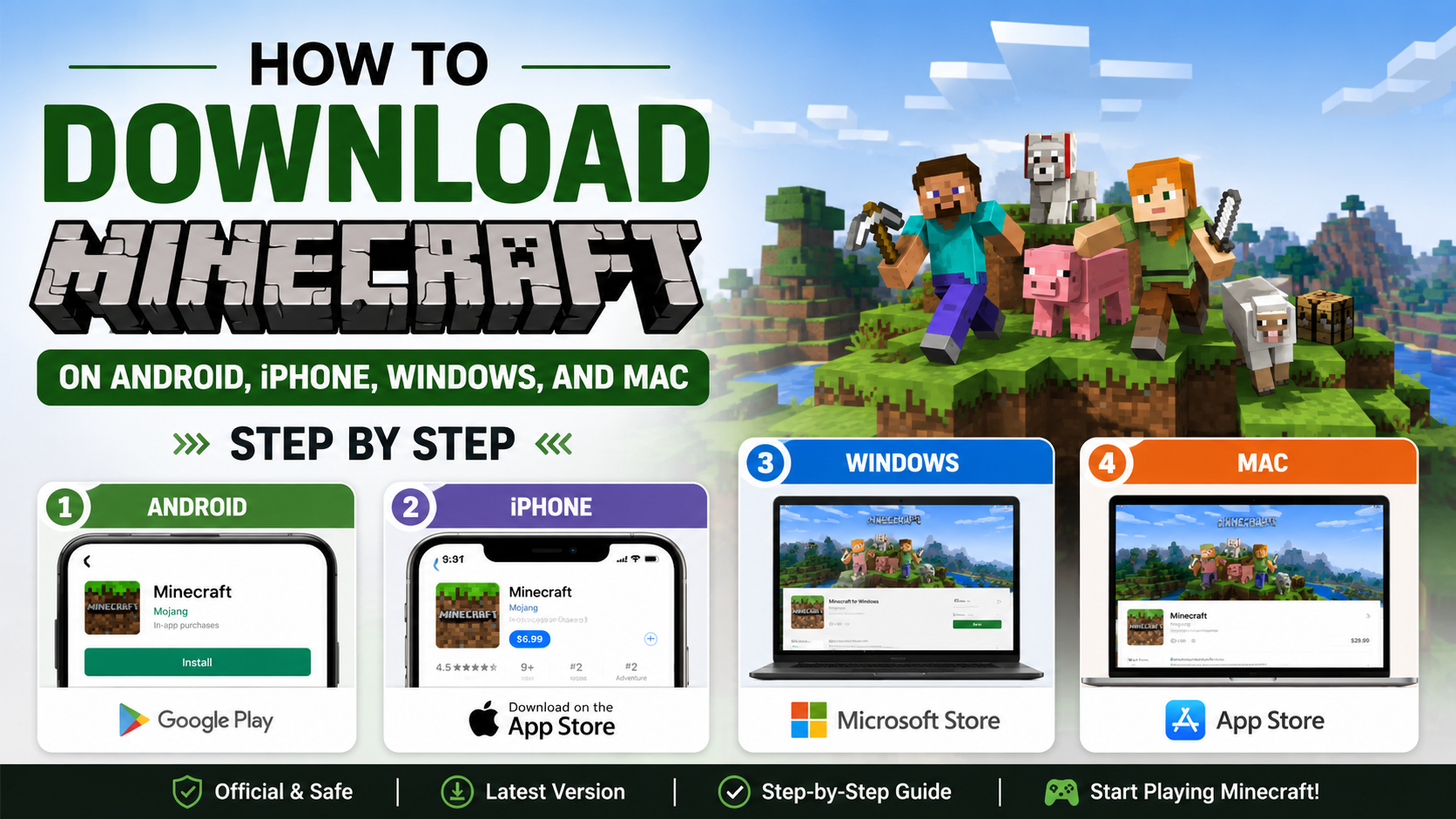
If you want to know how to download Minecraft, use an official store or Minecraft.net. Android users should install it from Google Play, iPhone and iPad users from the App Store, and Windows or Mac users from the official Minecraft Launcher. Avoid “free APK” websites and cracked launchers, which may contain modified files, malware, or copyright-infringing copies.
This guide explains the correct download and installation process for each platform, the difference between Java and Bedrock Edition, account requirements, free-trial options, and common fixes.
Key Takeaways
- Install Minecraft for Android through Google Play and for iPhone/iPad through Apple’s App Store.
- Download the Windows and Mac launcher only from Minecraft’s official download page.
- Windows PC buyers receive access to both Java Edition and Bedrock Edition through the PC package.
- macOS officially supports Java Edition; the Windows Bedrock edition is not a native Mac version.
- A Microsoft account is needed for PC play and enables multiplayer, Realms, Marketplace, and cross-platform features.
- Minecraft is normally a paid game, but official trial versions are available on selected platforms.
Choose the Correct Minecraft Edition

Minecraft is distributed differently depending on your device.
| Device | Official edition | Where to download |
|---|---|---|
| Android phone or tablet | Bedrock Edition | Google Play |
| iPhone or iPad | Bedrock Edition | Apple App Store |
| Windows 10/11 PC | Java + Bedrock for PC | Minecraft Launcher or Microsoft Store |
| Mac | Java Edition | Minecraft Launcher |
| Linux | Java Edition | Minecraft.net |
Bedrock Edition is the mobile and Windows version designed for cross-platform play with Xbox, PlayStation, Nintendo Switch and mobile devices. Java Edition is the PC version for Windows, macOS and Linux, and it has its own modding and server ecosystem. Java and Bedrock players cannot normally join the same worlds because they use different game platforms.
How to Download Minecraft on Android
The safest method is the official Google Play listing published by Mojang. The listing identifies the developer as Mojang and currently labels the game “Minecraft: Dream it, Build it!” Open the official Google Play listing.
Steps to install Minecraft on Android
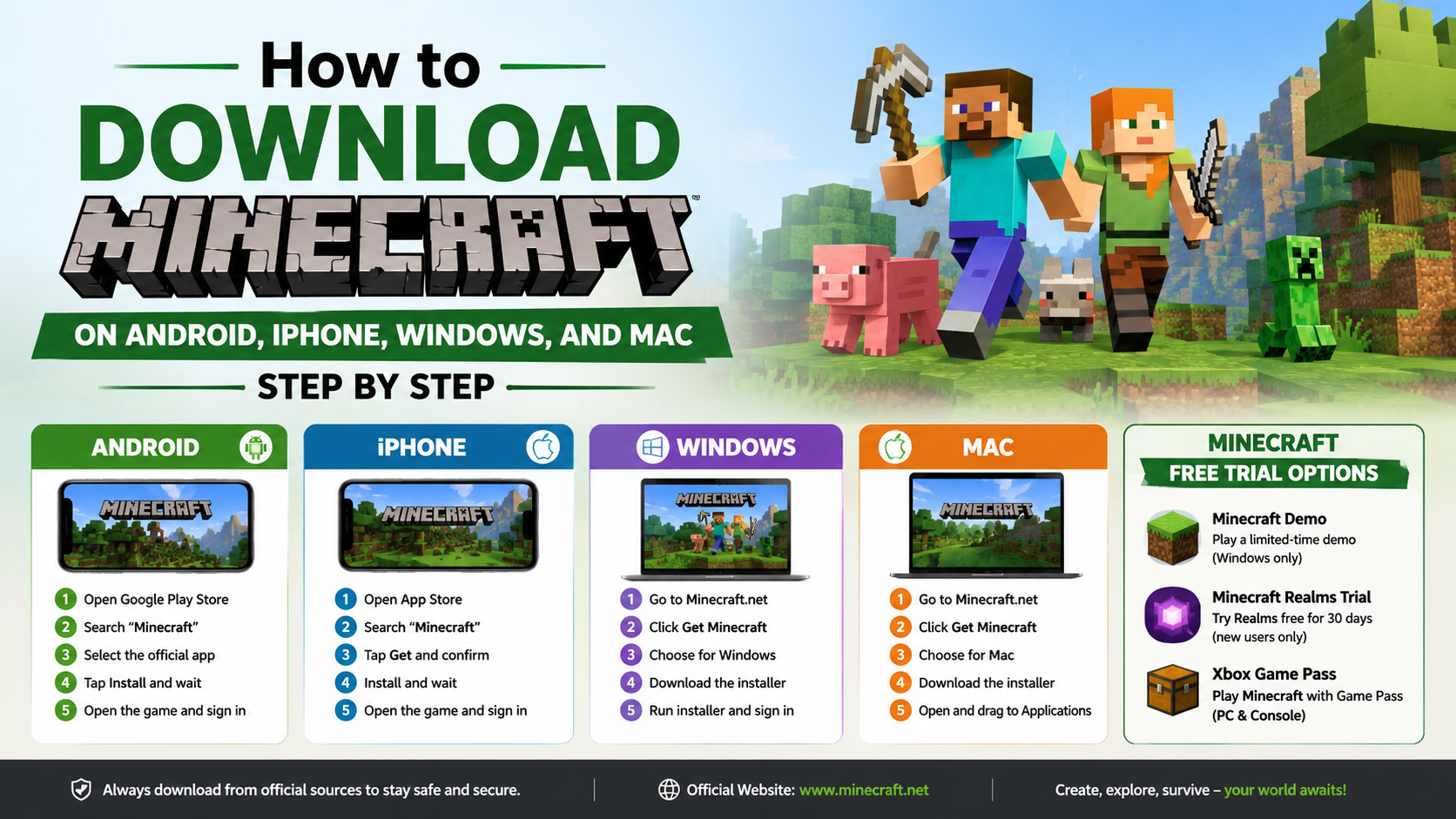
- Open the Google Play Store on your Android phone or tablet.
- Search for Minecraft.
- Select Minecraft: Dream it, Build it! by Mojang.
- Check the developer name and reviews before installing. Do not choose similarly named block-building games.
- Tap the price or Buy button.
- Complete payment using an available Google Play payment method in India.
- Tap Install.
- Wait for the download and installation to finish.
- Tap Open, then sign in with your Microsoft account if prompted.
The Google Play version is Bedrock Edition. It includes Creative and Survival modes, Marketplace content, add-ons and multiplayer features. Online multiplayer and cross-platform features require a Microsoft account in addition to the Google account used for the purchase. Minecraft’s account guidance lists Android as requiring a Google account for the store and a Microsoft account for advanced features such as cross-play, Realms and social functions. citeturn1search0
Android compatibility and storage
Minecraft’s exact device requirements can change with updates. Check the “About this game” section in Google Play and the official Minecraft requirements help page before purchasing. Keep additional free storage available for updates, Marketplace downloads and saved worlds. A stable Wi-Fi connection is preferable if you are using a mobile data plan.
Is there a free Minecraft version for Android?
Mojang offers an official, time-limited Minecraft Trial on Google Play in supported regions. It provides a restricted Survival experience; Creative mode, full multiplayer and other features require the paid game. Trial worlds do not automatically transfer to the full version. citeturn0search3
How to Download Minecraft on iPhone or iPad
Install Minecraft only through Apple’s App Store. The official Indian listing is published by Mojang AB and supports iPhone and iPad. Open Minecraft on the India App Store.
Steps to install Minecraft on iPhone
- Open the App Store.
- Tap Search and enter Minecraft.
- Select Minecraft: Dream it, Build it! by Mojang AB.
- Confirm that the app is the official Mojang listing.
- Tap the price button.
- Approve the purchase with Face ID, Touch ID or your Apple ID password.
- Tap Get or the download icon.
- Wait for installation, then tap Open.
- Sign in with a Microsoft account if you want cross-platform play, Realms or other online features.
The India App Store listing states that the app requires iOS 13 or later on iPhone and iPadOS 13 or later on iPad. It also lists an app size of approximately 1.6 GB, although the space needed can change after updates and additional content. citeturn0search1
Minecraft’s mobile purchase is tied to the Apple account and platform store. Buying the iPhone version does not automatically give you the PC version. If you move from Android to iPhone, you generally need to purchase the iOS version separately.
How to Download Minecraft on Windows 10 or 11
For Windows, download the official Minecraft Launcher from Minecraft.net/download or install it through the Microsoft Store. The Launcher is the central application for downloading, updating and starting Minecraft games. citeturn0search0
Steps to install Minecraft on Windows
- Open a browser and visit Minecraft.net/download.
- Select Download Launcher, or open the Microsoft Store link shown on the page.
- Install the Minecraft Launcher.
- Start the Launcher from the Windows Start menu.
- Select Microsoft Login and sign in, or create a Microsoft account.
- Choose Minecraft: Java & Bedrock Edition for PC.
- If you own the game, select Install or Play.
- Choose Java Edition or Minecraft for Windows (Bedrock Edition).
- Allow the game to download and finish installing.
- Select Play.
The official PC package includes both Java Edition and Bedrock Edition for Windows. Java runs on Windows, macOS and Linux, while Bedrock is the Windows version designed for cross-play with consoles and mobile devices. citeturn0search7
If you previously bought Minecraft for PC, install the Launcher and sign in with the same Microsoft account that owns the purchase. You should not need to buy it again on a new Windows computer. citeturn0search5
Windows requirements
Check the current Java and Bedrock requirements before installing, especially on older laptops. Minecraft performance depends on processor speed, available memory, graphics hardware, storage and the selected render distance. Lowering graphics settings and render distance can help on budget Indian laptops.
How to Download Minecraft on Mac
macOS officially supports Minecraft: Java Edition. Download the Launcher from Minecraft.net rather than from third-party software sites.
Steps to install Minecraft on Mac
- Visit Minecraft.net/download.
- Select the Mac download option.
- Download the Minecraft Launcher installer.
- Open the downloaded installer and follow the macOS prompts.
- Launch Minecraft from Applications.
- Sign in with your Microsoft account.
- Select Java Edition.
- Choose the latest release shown in the Launcher.
- Click Play and allow the required files to download.
The official store information confirms that Java Edition runs on macOS. Java Edition supports cross-play with Windows and Linux Java players, but it does not join Bedrock mobile or console worlds directly. citeturn0search7
On Apple-silicon Macs, such as models with M-series chips, check the current system requirements and keep macOS updated. If the Launcher opens but the game crashes, reduce memory allocation and graphics settings; Minecraft support recommends checking available RAM and Java Launcher memory settings when troubleshooting crashes. citeturn1search7
Minecraft Free Trial Options
Minecraft’s official free-trial page provides downloads for selected devices:
- Bedrock Edition: Windows 10/11 and Android
- Java Edition: Windows, Mac and Linux
The trial offers the core Survival experience for a limited period. Online multiplayer servers are disabled, although local-area-network play may be available under the trial’s restrictions. The official page says trial play is approximately 100 minutes of in-game time, or around five in-game days, with variation by device. citeturn0search2
An iPhone free trial is not listed on that official trial page. Availability can also vary by region and store, so use the official Minecraft or Apple listing rather than downloading an IPA file from a website.
Common Minecraft Download and Installation Problems
Minecraft does not appear in Google Play or the App Store
Check that your device meets the store’s compatibility requirements and that the correct country or region is selected. Update Google Play Services or iOS, then search again. Do not install an APK or IPA from an unknown source to bypass a store restriction.
The purchase does not appear after reinstalling
Use the same Google account or Apple ID that made the purchase. On Windows and Mac, use the Microsoft account that owns Minecraft. A purchase made on one platform usually does not transfer to another platform.
The Minecraft Launcher will not open
Restart the computer, install pending Windows or macOS updates, and update the Launcher through the Microsoft Store or Minecraft.net. If necessary, uninstall and reinstall the official Launcher. Avoid unofficial launchers claiming to provide paid Minecraft for free.
Minecraft crashes or runs slowly
Try these steps:
- Close other apps before launching the game.
- Free up storage space.
- Update the operating system and graphics drivers on PC.
- Lower render distance and graphics settings.
- On Java Edition, check that allocated memory is appropriate for your installed RAM.
- Back up worlds before changing files or reinstalling.
Multiplayer is unavailable
Sign in with a Microsoft account, confirm that all players use compatible editions, and install the same game version. Bedrock players can play together across supported mobile, Windows and console platforms; Java players need Java Edition on a compatible PC.
Is It Safe to Download Minecraft APKs?
The official Android download is Google Play. An APK from a random website is not an official Minecraft distribution and may be modified, outdated or bundled with malicious software. Cracked copies can also fail to update, corrupt worlds or expose account credentials.
For Windows and Mac, use Minecraft.net or the Microsoft Store. For iPhone and iPad, use the App Store. These sources provide publisher information, updates, account-based licensing and store security controls.
Frequently Asked Questions
Is Minecraft free to download?
The official full game is generally paid. Selected platforms offer an official time-limited trial, but it does not include every feature of the purchased version. Store prices and taxes can change, so check the current amount shown in your Indian storefront before paying.
Can I download Minecraft without a Microsoft account?
You may be able to install the mobile app using your Google account or Apple ID, but a Microsoft account is required for many advanced features, including cross-platform multiplayer, Realms and Marketplace access. PC play uses a Microsoft account. citeturn1search0
Can I play Minecraft bought on Android on my PC?
No. Mobile and PC purchases are sold through separate platforms. You can use the same Microsoft account for online features, but you normally need a PC license for Windows or Mac.
Which Minecraft edition should I choose on Windows?
Choose Minecraft for Windows (Bedrock) for cross-play with mobile and consoles. Choose Java Edition for Java servers, PC modding and the Java community. The PC package includes both editions.
Can I install Minecraft Java Edition on Mac?
Yes. Java Edition is officially available for macOS through the Minecraft Launcher. The Windows Bedrock edition is not a native macOS release.
Does uninstalling Minecraft delete my worlds?
It can, depending on the platform and how world data is stored. Back up important worlds before uninstalling, changing storage settings or moving to a new device. Minecraft provides separate backup and transfer guidance for world files. citeturn0search5
How do I update Minecraft?
On Android and iPhone, open Google Play or the App Store and select Update. On Windows and Mac, open the Minecraft Launcher; it normally presents the latest release automatically. citeturn0search4